

You're juggling content across TikTok, Instagram, YouTube, Twitter/X, Facebook, LinkedIn, and probably newer platforms like Threads and Bluesky. Manually posting means switching between apps constantly, reformatting the same post eight different ways, trying to remember which platform needs content at 3 AM for your European audience.
It's exhausting.
A good social media scheduler changes this completely. You batch-create your content once, schedule it to post at optimal times across every platform, and maintain consistency without the daily scramble. Manual posting wastes hours that could go toward actually creating.
This guide will help you find the best social media scheduling tool for your creator workflow in 2026. We'll cover what actually matters (multi-platform support, pricing that makes sense, features you'll use), compare the top options, and help you choose based on your specific needs.

Why Do I Need a Social Media Scheduler?
Here's what schedulers actually do for you:
Save time and stress. Batch-schedule a week or month of content in one session. No more "oops, I forgot to post today!" panic. Your scheduler handles it while you're creating, sleeping, or just living your life.
Stay consistent. Algorithms favor regular posting. Brands that post consistently see up to 35% higher engagement compared to sporadic posters. A scheduler keeps your feed active even when life gets chaotic.
Reach global audiences. You can hit TikTok at 3 AM (perfect for your European followers) and LinkedIn at 9 AM (catching US professionals) without actually being awake for either. Your content reaches people when they're most active, regardless of your timezone.
Improve your content. Many schedulers suggest best posting times and include AI tools for caption generation and hashtag discovery. Some can even auto-add your first comment (perfect for Instagram hashtags or YouTube comment links).
Learn what works. The better schedulers include analytics showing engagement, reach, and follower growth. You can see what content performs best and refine your strategy based on actual data, not guesses.
In short: a scheduler is like an extra team member dedicated to your content distribution. It ensures you're working smarter, not harder.
Create once, post everywhere
post bridge publishes and schedules your posts to Instagram, TikTok, YouTube, X, LinkedIn, Facebook, Pinterest, Threads, Bluesky and Google Business Profile from one dashboard.
Try it free for 7 daysHow to Choose a Social Media Scheduler
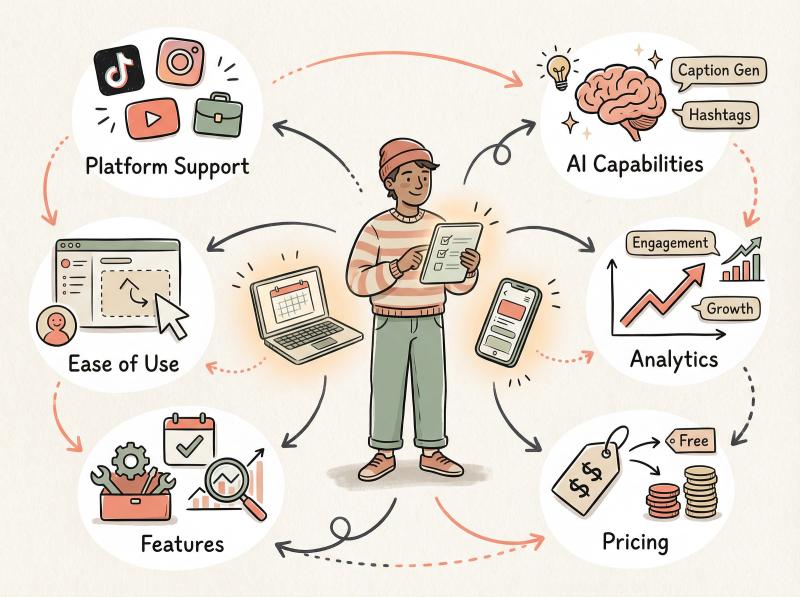
Not all social media management tools are built for solo creators or small teams. Many were designed for corporate marketing departments and come loaded with features (and prices) you'll never need.
When choosing the best scheduler for creators, focus on these factors:
What Platforms Should a Scheduler Support?
Ideally, it should handle all the networks you actually use. The top tools now support 7+ platforms including newer additions like TikTok, Threads, and Bluesky. Check that your favorite platforms are included.
If you're big on Pinterest or YouTube Shorts, verify those specific content types are supported. Not every scheduler handles every format on every platform.
What's the Easiest Social Media Scheduler to Use?
As a creator, you probably don't have an IT team to onboard you. Look for:
① A clean, intuitive interface with a visual content calendar
② Drag-and-drop scheduling capabilities
③ Post previews showing exactly how content will appear
④ Quick setup (you should be scheduling within minutes, not hours)
The best schedulers have clean, beginner-friendly dashboards that get you posting quickly.
What Features Does a Social Media Scheduler Need?
The basics matter most:
Draft saving so you can work on posts over time.
Content libraries for reusing assets across posts.
Bulk uploading if you batch-create lots of content (CSV import is gold for this).
First comment scheduling (super useful for Instagram hashtags).
Support for all post types: carousels, stories, reels, YouTube Shorts, TikTok videos, etc.
Which Schedulers Have AI Features?
Many creators repurpose evergreen content. Tools that let you categorize posts and automatically recycle them on whatever schedule you set can keep your feeds active without constant manual effort.
Also consider built-in AI features. Some schedulers can generate caption ideas or suggest trending hashtags, saving you time on the writing part of content creation.
Best Scheduler for Analytics and Insights
Basic analytics (likes, shares, comments per post) are common. Better schedulers show you:
- When your audience is most active
- Which content types perform best
- Growth trends over time
If you're data-driven, deep insights including competitor analysis can guide your strategy. But if numbers bore you, a simpler dashboard might be better.
Do I Need Team Features in My Scheduler?
If you have a small team (an editor, a VA, someone who handles replies), check for:
- Multi-user support
- Approval workflows
- Comment/feedback features
- Role-based permissions
Some tools excel at team collaboration with post previews and feedback features. But if you're truly solo, you won't need this.
How Much Should a Social Media Scheduler Cost?
Creators are usually budget-conscious. Some schedulers are free or very affordable ($9-12/month), while enterprise tools cost hundreds monthly. Pay attention to:
| Factor | What to Check |
|---|---|
| Pricing structure | Is it per user, per profile, or flat-rate? |
| Account limits | How many social profiles can you connect at each price tier? |
| Post limits | Are there caps on scheduled posts per month? |
| Hidden costs | Do analytics, team features, or bulk upload cost extra? |
We've seen creators get shocked when a "$6/month" tool ends up costing $54/month because it charges per channel and they need nine channels.
Current pricing is accurate as of early 2026, but always check the latest figures as these change.
Now for the actual tools.
Best Social Media Schedulers for Creators in 2026
Below we break down the best scheduler apps, from longtime favorites to new challengers. Each has its own strengths, so the "best" really depends on your priorities.
Post Bridge (Indie All-in-One Scheduler on a Budget)
What makes it different:
Post Bridge was built by a solo creator for fellow creators. Its claim to fame is letting you post to nine platforms at once from one simple dashboard. Supported networks include X (Twitter), Instagram, Facebook, LinkedIn, TikTok, YouTube, Pinterest, plus newer platforms like Threads and Bluesky. Few tools cover that range.
The interface is straightforward: connect your accounts, draft a post (text, image, or video), select which platforms to publish on, and schedule or post instantly. Post Bridge intentionally avoids "enterprise bloat" and focuses on quick, effortless cross-posting.
Pricing advantage:
Indie price, nine-channel reach, no enterprise bloat. It's arguably the most affordable multi-platform scheduler in its class.
| Plan | Price | Social Accounts | Features |
|---|---|---|---|
| Starter | $9/mo | 5 accounts | unlimited scheduled posts, basic features |
| Creator | $18/mo | 15 accounts | extra media processing, priority queue |
| Pro | $27/mo | 30 accounts | bulk CSV upload, team roles, API access, priority support |
Annual billing cuts these prices by ~40%. There's also a free tier (5 posts/month) if you want to test it out.
Compare this to legacy tools that might charge $6 per channel. If you're managing profiles on five platforms, Post Bridge costs $9 total while alternatives could cost $30+.
Features creators love:
Beyond the price, Post Bridge offers:
- A built-in content studio for basic editing and video trimming
- A viral template library for tweet threads if you need inspiration
- Support for multiple accounts per platform (great for managing client profiles or multiple brands)
Users also appreciate the simplicity. You can connect multiple accounts per platform and manage many profiles at scale.
Standout insight: as one reviewer put it, there's "literally no easier way" to multipost content, and at a price that's 10× cheaper than some mainstream options.
What it doesn't do (yet):
As a newer tool (launched late 2024), Post Bridge is still adding features. It doesn't yet support scheduling to Reddit (a common request) and lacks a deep analytics dashboard. If you need robust reporting or social listening, check the pricing tiers for updates.
Also, as a lean indie product, there's some "single-founder risk." But the creator is very active and transparent about the roadmap.
Best for:
Creators who want maximum platform coverage on minimal budget. If you're active on many networks (including emerging ones) and value ease-of-use over advanced bells and whistles, Post Bridge is an excellent choice. It's perfect for solo content creators, influencers, or small businesses who find other tools too limiting or too expensive when scaling up profiles.
Try Post Bridge free to experience the difference.
Buffer (Best Free Plan & Beginner-Friendly Design)
What makes it different:
Buffer is a veteran scheduler known for its clean interface and simplicity. Many creators start with Buffer's free plan, which lets you connect 3 social channels and schedule up to 10 posts per channel at a time.
Buffer supports all major platforms and as of 2025 added TikTok and Threads integration, so you can now schedule TikTok videos and Threads posts through Buffer.
① The UI is often praised as one of the most intuitive: minimal clutter, a sidebar of your connected accounts, and a simple calendar or queue view for scheduled posts.
② Highly recommended for beginners who need something that just works without a learning curve.
Pricing structure:
Buffer's free plan is generous for single users. When you outgrow it, Buffer's pricing is à la carte: roughly $6 per month per social channel on the "essentials" plan with unlimited posts.
This can be very affordable if you only use a couple of platforms. (They offer volume discounts if you manage many profiles.)
Features creators like:
- A basic AI assistant to suggest post ideas or rewrite captions (though it tends to produce somewhat generic text)
- Support for Instagram Reels and stories scheduling (stories have some limitations with interactive stickers)
- A content "ideas/templates" library with quick post templates
- Recently introduced a "save as draft" option and reusable time slots
What it doesn't do:
Buffer lacks some advanced features. There's no true evergreen content recycling (you can re-Buffer posts manually, but it doesn't auto-rotate a queue). Analytics are fairly basic unless you upgrade to higher plans.
And while Buffer's per-channel pricing can be cheap for a few accounts, it becomes pricey as you add multiple platforms or team members. Managing 6-8 channels runs $36-48/month, at which point flat-rate tools like Post Bridge might be worth considering.
The free plan also limits you to 10 scheduled posts per profile, which heavy users will hit quickly.
Best for:
New creators and small-scale social users. If you're just starting out or have 2-3 core profiles to manage, Buffer's free or essentials plan is a fantastic, low-risk choice. It's also ideal for those who value a polished, clutter-free interface over having every possible feature.
Many creators use Buffer in their early growth phase and consider other tools later if they need more horsepower.
Later (Best for Visual Planning (Instagram/TikTok))
What makes it different:
Later is especially popular among Instagram influencers, designers, and e-commerce creators who care about visual branding. Later's interface is built around a visual content calendar and media library. You can upload photos/videos, drag them onto a calendar grid, and get a preview of your Instagram feed's layout before posts go out.
It supports Instagram, TikTok, Facebook, Pinterest, X, LinkedIn, and even Snapchat as of 2025. But it's clear Later was born with Instagram in mind.
Pricing:
Later offers a free plan with limitations and paid plans starting around $18-25/month for creators. On a paid plan, you can schedule Instagram stories, carousel posts, and use their visual scheduler fully.
Features visual creators love:
- Plan your grid: see how posts will look next to each other (huge for Instagram aesthetes)
- Best time to post suggestions: Later analyzes past engagement to recommend time slots
- First comment scheduling: handy for adding hashtags without cluttering your caption
- UGC finder: helps you find and repost content you're tagged in
- Intuitive drag-and-drop scheduling that feels natural for calendar-based planning
What it doesn't do well:
Later's strength in visuals is somewhat a weakness if you need a text-centric approach. Some users find Later too Instagram-focused. If you mostly create text Threads or Twitter content, Later's interface may feel oriented around images.
As one creator noted, "it's great if Instagram is your main platform, but I needed something that works equally well across platforms" (which is where Post Bridge excels).
Pricing could climb if you need many accounts or team members. Some advanced features (like influencer collaboration or detailed analytics) are only on higher plans.
Best for:
Visual content creators and Instagram-first creators. If you're an artist, designer, or anyone who cares about the aesthetic look of your feed, Later makes planning and scheduling much easier. The grid preview is easy to use and keeps your aesthetic consistent.
Brands and influencers who work primarily with images, reels, and stories will get the most out of Later.
SocialBee (Best for Content Recycling & Category Scheduling)
What makes it different:
SocialBee is often recommended by content creators who manage a lot of content across multiple profiles. Its standout feature is content categorization with automated recycling.
You create categories (e.g. "quotes", "promotions", "tips") and set a posting schedule for each. SocialBee will pull posts from each category's library to fill your calendar, ensuring a balanced mix and automatically republishing evergreen posts over time.
This is a huge time-saver if you have a backlog of evergreen content.
Platform support:
SocialBee supports Facebook, Instagram, Twitter (X), LinkedIn, Pinterest, Google My Business, TikTok, YouTube, and even Threads and Bluesky. It's a fully loaded tool with features beyond scheduling: a social inbox, an AI assistant for generating post ideas, Canva integration, and team collaboration tools.
Pricing:
Plans start at $29/month for 5 social profiles and $49/month for 10 profiles (one workspace/user). Essentially, SocialBee is a "step up" tool when you're ready to invest in more automation and depth.
Why efficiency-focused creators love it:
- Recycle evergreen posts elegantly with category queues (e.g., "share a throwback tip every Monday at 9 AM"
- Color-coded content calendar for visual overview of your content mix
- Analytics with up to 2 years of data on higher plans (useful for tracking growth trends)
- Integration with tools like Quuu for content suggestions
- Browser extension to easily add content to your queues
In discussions, users mention SocialBee as "way more affordable for what you get" when managing multiple accounts compared to big-name competitors.
What it doesn't do:
The main trade-off is complexity. With great power comes a steeper learning curve. SocialBee has a lot of features and settings, which some users find overwhelming at first compared to simpler tools like Post Bridge.
Advanced automation requires careful setup to avoid your feeds feeling too repetitive or robotic.
Starting at $29/mo for one user is several times Buffer's cost. If you're only on 2-3 platforms and don't need recycling, Post Bridge's $9 starter plan might be more sensible.
Best for:
Content-heavy creators, agencies, or those managing multiple brands/accounts. If you have a library of evergreen content or run many social profiles, SocialBee will save you hours with its automation.
It's great for bloggers, coaches, or small agencies who create recurring content (like weekly blog posts, tips, quotes) and want to ensure a consistent presence without manual scheduling 24/7.
Hootsuite (Best for Comprehensive Features (Overkill for Most Creators))
What makes it different:
Hootsuite is one of the oldest and most feature-packed social media management platforms. It's on this list because any "best schedulers" roundup would be incomplete without it, but note that Hootsuite is geared toward businesses and agencies more than individual creators.
Hootsuite supports a wide array of networks including Facebook, Instagram, Twitter, LinkedIn, YouTube, Pinterest, TikTok, Threads, and even WhatsApp in some capacity. It not only allows scheduling but also has a multi-column dashboard for monitoring feeds, mentions, and messages across accounts in real-time (social listening).
Pricing:
All that comes at a price. Hootsuite's standard professional plan starts at $99 per month for 1 user and up to 10 social profiles. Higher-tier plans for teams cost significantly more per user.
So while it's powerful, it's not cost-effective for most creators unless you're operating at a business level.
Why it's notable:
Hootsuite's feature set is very comprehensive. If you can think of a social media task, Hootsuite likely does it:
- Bulk uploading hundreds of posts via CSV
- Previewing and scheduling Instagram stories
- Managing ad campaign posts
- Integrating with YouTube scheduling
- An app ecosystem with plugins for other networks
For example, when Instagram and Threads opened up scheduling API access, Hootsuite was among the first to integrate. Users could schedule Threads posts and see Threads analytics through Hootsuite.
So it's always up-to-date with platform changes.
Honest take: for an individual, Hootsuite is usually too much. At $99/month, it's "overkill for a solo creator".
Why it's usually overkill for creators:
You end up paying for features like team collaboration, advanced analytics, social listening, and organization-wide asset libraries that you might never touch.
Also, Hootsuite's interface can feel outdated and complex. The dashboard with many columns and streams isn't as clean as modern tools like Post Bridge.
Finally, cost is prohibitive. There's no viable free plan (only a 30-day trial). Spending ~$1,200 a year on a scheduler makes sense only if it's directly driving significant ROI.
Best for:
Agency-like use cases or power users. If you're a creator who has evolved into running a small agency or managing numerous client accounts, Hootsuite could be worth it. It's also useful if you're not just scheduling posts, but actively monitoring brand keywords, doing customer service via social, and pulling detailed reports for partnerships or sponsors.
For 99% of individual creators, though, a leaner tool like Post Bridge will cover your needs at a fraction of the price.
Other Noteworthy Tools (Honorable Mentions)
| Tool | Starting Price | Best For | Standout Feature |
|---|---|---|---|
| Sprout Social | ~$249/mo for 5 profiles | Enterprise reporting & CRM | Extremely deep analytics, sentiment tracking, automated inbox responses |
| Metricool | Free plan; ~$18/mo premium | Data-driven creators & marketers | Robust analytics suite, competitor analysis, website analytics integration |
| Publer | Free plan; ~$12/mo for 3 accounts | Automation-heavy workflows | Bulk CSV scheduling, auto-recurring posts, first comment scheduling, watermarking |
| Pallyy | ~$25/mo for 10 accounts | Instagram & TikTok creators | Instagram-first design (grid preview, hashtag groups), social inbox, AI caption tools, bio link |
| Planable | Free tier available | Team collaboration & approvals | Visual post previews, approval workflows, sandbox environment for client feedback |
| RecurPost | Free plan; paid plans available | Evergreen content recycling | Simple autopilot recycling, category queues similar to SocialBee |
In the past year or two, several new scheduling platforms have emerged targeting creators. Tools are appearing that offer sleek, minimal interfaces with unlimited accounts, AI-powered scheduling features, and multi-platform support (9+ networks) with content generation capabilities.
The fact that these exist is good news for creators: it means more competition and innovative features at lower price points. The downside is these ultra-new tools may not have the track record or stability of established players like Post Bridge.
So which one is right for you?
How to Choose the Right Scheduler for Your Needs
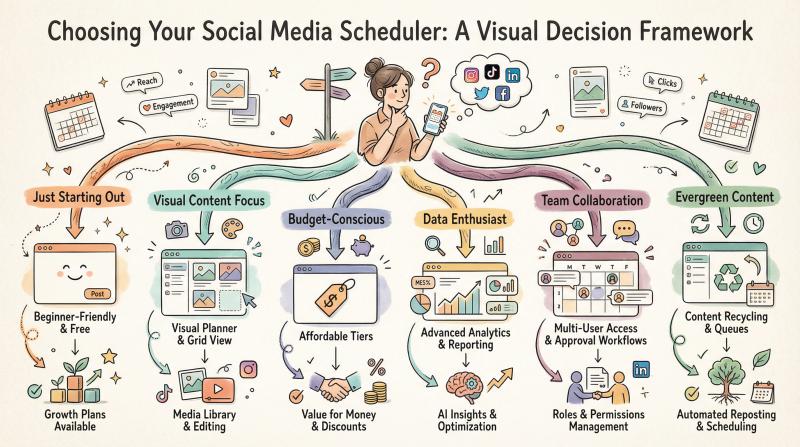
Ultimately, the best social media scheduler for you depends on your unique workflow and goals. Quick decision framework:
Just starting out or only need basic scheduling on a few platforms?
Try a free tool for its simplicity. You can always upgrade to Post Bridge later when you scale.
Instagram or visual content is your primary focus?
Consider Later for its visual planner, or explore Post Bridge's Instagram scheduler if you want similar features at lower cost.
Lots of evergreen content to manage?
Look at SocialBee or RecurPost. These tools are built for content recycling and keeping a full content pipeline automatically.
Multi-platform creator on a budget?
Post Bridge was built for you. Widest platform support at indie prices, without the fluff. Check the pricing to see how much you'll save.
Data and analytics enthusiast?
Maybe Metricool for its insights, or check if Post Bridge's roadmap includes enhanced analytics features.
Collaborating with others or managing clients?
Planable or Hootsuite/Sprout (if budget allows) will provide the collaboration and approval flows needed.
Need to "set and forget" content?
A scheduler with automation like Publer (bulk uploads) or Post Bridge's bulk CSV feature (pro plan) will serve well.
Critical insight: the choice between manual posting and automation will determine whether your team maintains authentic engagement or trades convenience for less control. Choose a scheduler that enhances your workflow without replacing your authentic voice.
Remember, tools can change quickly. New features roll out, prices change, and APIs evolve (for instance, Threads scheduling became possible in late 2025). Always check the latest info and take advantage of free trials. Most schedulers offer at least 7-14 day trials or free plans. Try Post Bridge free and see which interface and features click with you.
Does Scheduling Hurt Social Media Engagement?

No matter which scheduler you choose, don't completely "set and forget" your socials.
Scheduling helps maximize your time, but the social in social media still matters. Make sure to:
Engage with comments. Respond to questions, thank people for shares, join conversations. This can't be automated effectively.
Stay current on platform trends. New content formats or algorithm changes happen regularly. Post Bridge handles the routine distribution, but you need to adapt your content strategy as platforms evolve.
Post spontaneously sometimes. When something timely or trending arises, jump on it in real-time. Your scheduler handles the planned content so you can be reactive when it matters.
Monitor what's working. Use your scheduler's analytics to see which content resonates, then create more of that. Scheduling is distribution; strategy is still up to you.
Think of your scheduler as a distribution assistant. It ensures your planned content goes out consistently and reaches audiences at optimal times. This frees you up to focus on creating better content and genuinely engaging with your community.
The best creators use scheduling to handle the logistics so they can spend more time on the creative and relational aspects that actually drive growth.
Frequently Asked Questions
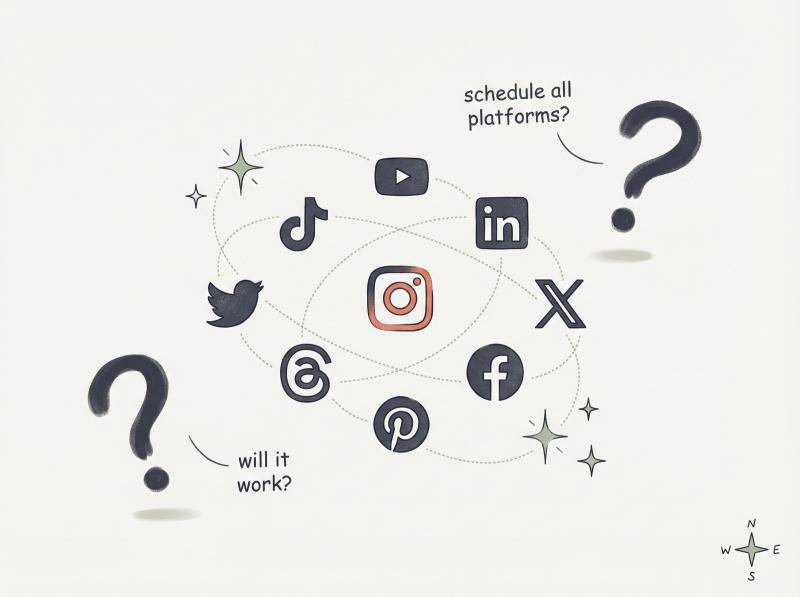
Q: Can I really manage all my social platforms from one tool?
Yes, but it depends on the tool. Post Bridge supports nine major platforms including TikTok, Instagram, YouTube, LinkedIn, X, Facebook, Pinterest, Threads, and Bluesky. Some tools support fewer platforms or have limitations on certain content types (like stories or reels). Always verify your specific platforms are supported before committing.
Q: Will scheduled posts perform worse than manual posting?
Not if you schedule strategically. Research shows consistent posting actually improves engagement. The key is scheduling for when your audience is most active (which many schedulers help you identify) and still engaging with comments and messages in real-time. Learn more about social media best practices.
Q: What's the difference between direct publishing and notifications?
Direct publishing means the scheduler posts directly to the platform without any action from you. Notification-based means you get a reminder to post manually (usually because the platform's API doesn't allow direct publishing). Most modern schedulers offer direct publishing for major platforms, but some features (like Instagram stories) may still require notifications on certain tools.
Q: Can I schedule Instagram Reels and TikTok videos?
Yes, on most modern schedulers. Post Bridge, Buffer, Later, and Pallyy all support TikTok video scheduling and Instagram Reels. Some platforms have size or length limitations based on what the platform APIs allow.
Q: How much should I budget for a social media scheduler?
It varies widely. Free options exist (Buffer's free plan, for example). Budget-conscious creators often spend $9-25/month on tools like Post Bridge, Pallyy, or Buffer's essentials plan. Mid-tier options like SocialBee run $29-49/month. Enterprise tools like Hootsuite or Sprout Social cost $99-249+/month but are usually overkill for individual creators.
Q: Do I need analytics if I'm just starting out?
Basic analytics help even beginners understand what content works. Most free and low-cost schedulers include simple metrics (likes, shares, reach). You don't need enterprise-level reporting when starting out. As you grow, you might want deeper insights, but simple analytics are fine for validating your content strategy early on.
Q: Can I try before I buy?
Almost always, yes. Most schedulers offer free trials (7-14 days) or free plans with limitations. Post Bridge has a free tier that lets you post 5 times per month. Buffer offers 3 channels with 10 posts each on their free plan. Take advantage of trials to test the interface and features before committing.
Q: What happens if a platform changes its API?
Good schedulers update quickly to accommodate API changes. This is actually an advantage of established tools, they have engineering resources to adapt fast. When Threads launched scheduling, tools like Hootsuite, Buffer, and Post Bridge added support within weeks. Smaller indie tools may take longer to adapt, but most prioritize staying current with major platforms.
Q: Should I schedule the same content to all platforms?
Generally, no. While schedulers let you cross-post easily, it's better to tailor content slightly for each platform. Post Bridge makes this easy: you can customize the caption, hashtags, or even the image/video for each platform in one workflow. What works on LinkedIn (professional tone) may not work on TikTok (casual, trend-driven). Smart scheduling means platform-specific customization, not just copy-paste everywhere.
Q: Can schedulers help me go viral?
Not directly. Schedulers handle distribution and timing, but going viral depends on content quality, relevance, and timing with trends. However, schedulers can help indirectly by:
- Ensuring consistent posting (which algorithms favor)
- Posting at optimal times when your audience is active
- Freeing up your time to create higher-quality content
- Some, like Post Bridge, include viral templates for tweet threads
The creativity and relevance that drives virality still comes from you.
Ready to Streamline Your Social Media?
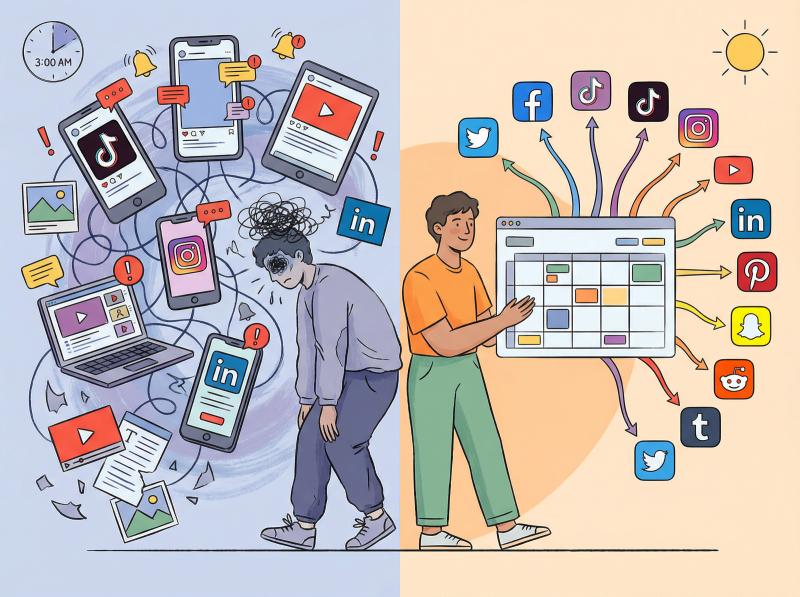
The best social media scheduler for creators in 2026 is the one that fits seamlessly into your creative workflow. For some, that's the ultra-simple Buffer. For others, the content-machine SocialBee. And for many creators managing multiple platforms on a budget, it's a new-age tool like Post Bridge that balances power and price.
Choose what makes your life easier, test it with a free trial, and then get back to what you love: creating amazing content.
Your audience doesn't care which scheduler you use. They just want consistent, quality content from you. Pick the tool that helps you deliver that without burning out, and you'll be way ahead of creators still manually posting to eight platforms at 3 AM.
Try Post Bridge free and see how effortless multi-platform scheduling can be. With support for all major platforms, affordable pricing, and helpful tools to grow your presence, it's built specifically for creators like you.