
Everyone asks this eventually: "When does YouTube actually start paying you?"
It's not as simple as uploading a few videos or hitting a certain view count. YouTube has specific requirements before they'll send you a check, and understanding the timeline can save you months of wasted effort.
The short answer? YouTube starts paying you once you're accepted into the YouTube Partner Program (YPP) and hit $100 in earnings.
But getting there requires meeting some serious benchmarks, and the journey varies wildly depending on your content strategy.
Why YouTube Doesn't Pay You Automatically
YouTube doesn't automatically share revenue with creators. You need to apply for and be accepted into the YouTube Partner Program before earning a cent from the platform itself.
Think of YPP as YouTube's gatekeeper. It unlocks all the major revenue streams: ad revenue sharing (where you get 55% of ad earnings), YouTube Premium subscriber views, channel memberships, Super Chats and Super Thanks during live streams, and merchandise shelf integration. None of these exist for you until YPP approves your channel.
Reality check: Most YouTube channels will never qualify. Out of roughly 120 million channels on YouTube, only about 20 million have at least 1,000 subscribers, and that's just one of the requirements.
The bar is deliberately high because YouTube wants creators who are serious, consistent, and building real audiences.
YouTube Monetization Requirements: How Many Subscribers and Watch Hours Do You Need?
Here's what YouTube requires for standard monetization:
Required metrics:
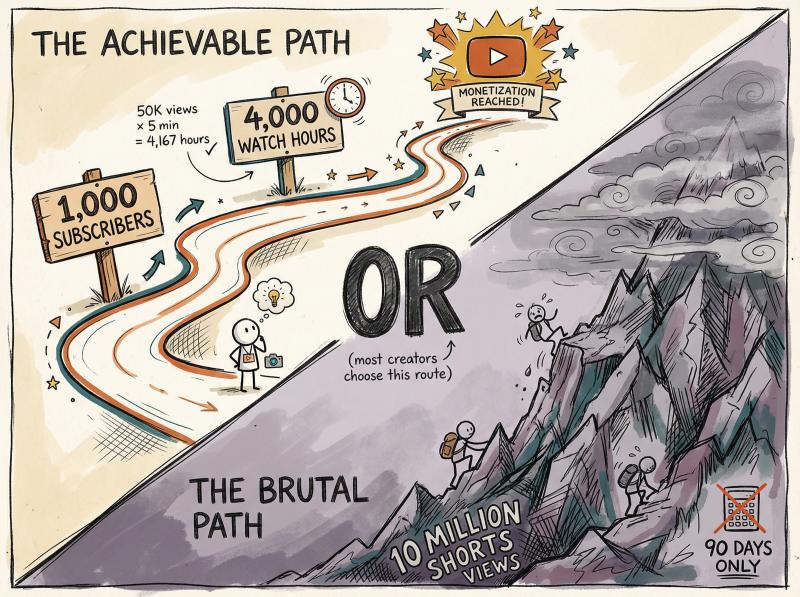
- 1,000 subscribers minimum on your channel
- 4,000 watch hours in the past 12 months OR 10 million Shorts views in the past 90 days
These aren't suggestions. They're hard minimums that YouTube enforces across all regions.
Most creators aim for the 1,000 subscribers + 4,000 hours path because 10 million Shorts views is brutally difficult for new channels. One moderately successful long-form video could generate 4,000 hours of watch time (240,000 minutes) with far fewer total views than you'd need for the Shorts route.
Example math: A video with 50,000 views at 5 minutes average watch time generates 250,000 minutes (4,167 hours). Combine a few videos like that and you hit 4,000 hours.
Meanwhile, a 30-second Short needs millions of views to make the same impact, and you need 10 million Shorts views in just 90 days.
The watch hour requirement also has a catch: only long-form videos count toward the 4,000 hours. Shorts views in the Shorts feed don't contribute to this metric at all, which frustrates a lot of Shorts creators.
What Is the 500 Subscriber Early Access Tier?
In mid-2023, YouTube introduced a lower eligibility tier for fan funding.
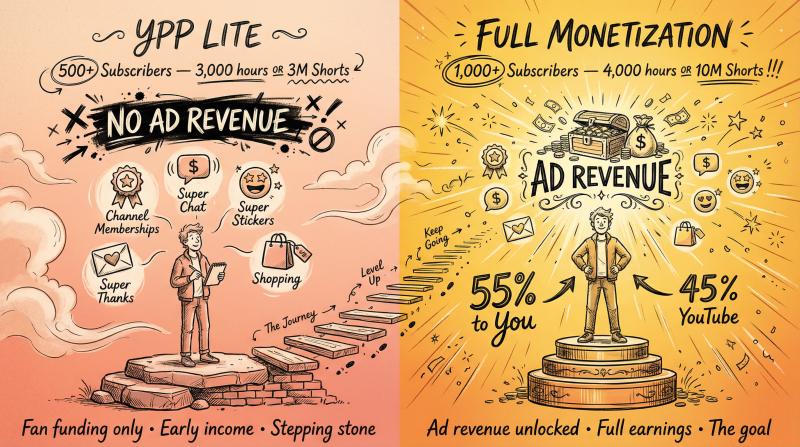
You can access some YPP features with:
- 500 subscribers
- 3 public videos in the last 90 days
- 3,000 watch hours (past 12 months) OR 3 million Shorts views (past 90 days)
What this unlocks: Channel Memberships, Super Chat/Super Stickers, Super Thanks, and YouTube Shopping integrations.
*What it doesn't unlock: Ad revenue.*
YouTube will not serve ads on your videos or share ad revenue until you hit the full 1,000 subscriber + 4,000 hour (or 10M Shorts) benchmark. The standard monetization criteria remain unchanged for earning from YouTube's advertising.
Think of the 500-sub tier as "YPP Lite." You can make some money from your audience directly, but YouTube itself only pays you ad revenue after you reach the higher threshold. For creators building tight communities, this can generate early income. For everyone else, it's a stepping stone, not the finish line.
Monetization Requirements Comparison
Requirement - Full Monetization (Ads) - Early Access (Fan Funding)
- Subscribers - 1,000+ - 500+
- Watch Hours OR Shorts Views - 4,000 hours OR 10M Shorts - 3,000 hours OR 3M Shorts
- What You Get - Ad revenue + all fan funding - Fan funding only (memberships, Super Chat, etc.)
- AdSense Requirement - Yes - Yes
- Who It's For - All creators seeking full monetization - Community-focused creators
What Other Requirements Does YouTube Have for Monetization?
Hitting subscriber and watch-hour targets isn't enough. You also need:
Compliance and account setup:
① Follow YouTube's monetization policies and community guidelines (original content, advertiser-friendly material)
② Have zero active Community Guidelines strikes on your channel
③ Enable 2-Step Verification on your Google account
④ Be in a country where YPP is available (120+ countries as of 2025)
⑤ Set up and link an AdSense account to receive payments
⑥ Be at least 18 years old (or have a legal guardian handle payments)
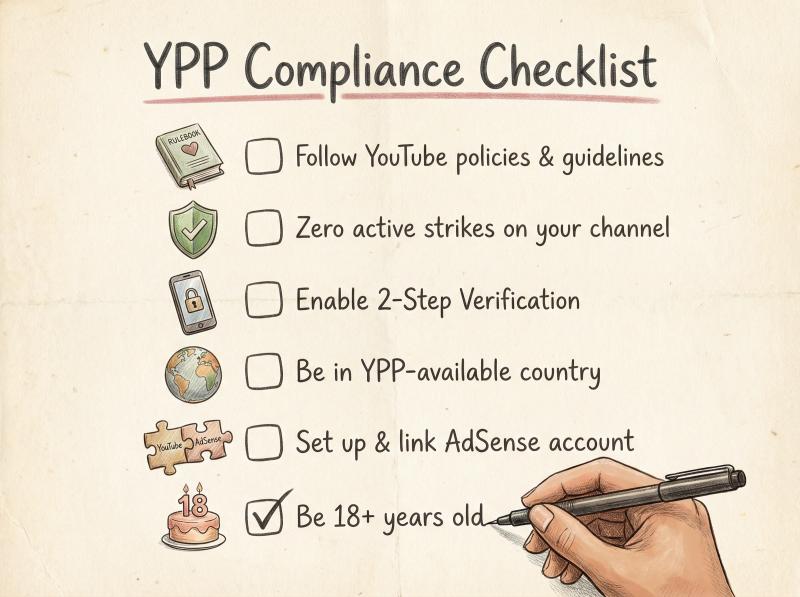
YouTube wants responsible creators in the program. Meeting the numeric thresholds proves you're serious. Following the rules proves you're trustworthy.
Channels that heavily reuse others' content, violate copyright, or post problematic material get rejected even with strong numbers.
How Long Does YouTube Partner Program Review Take?
So you've hit 1K subscribers and 4K hours. Great.
Now when do you get paid?
Step 1: Application
Go to YouTube Studio's Earn section and apply. You'll agree to the partner program terms, connect or create an AdSense account, and submit for review.
Step 2: Channel Review
YouTube reviews your content (mix of automated and manual) to ensure policy compliance. This typically takes a few weeks up to 1 month, though some creators get approved in days and others wait longer during high-volume periods.
Step 3: Monetization Activated
Once approved, you can turn on monetization for existing and new videos. Ads start running immediately, and eligible videos begin earning money from ad impressions, YouTube Premium views, and other interactions.
Step 4: Earnings Accumulation
Your revenue accrues in AdSense but doesn't pay out instantly. YouTube uses a monthly payment cycle, and there's a minimum threshold you need to hit before receiving your first payment.
When Does YouTube Send Your First Payment?
Having monetized videos doesn't mean money hits your bank account right away.
YouTube pays through AdSense on a specific schedule:
The $100 Payment Threshold
YouTube requires at least $100 USD in earnings before issuing a payment. (This varies by currency: roughly €70 in Europe, £60 in the UK, etc.)
If you haven't earned $100 yet, your balance rolls over to the next month. No exceptions.
All your monetization income counts toward this threshold: ad revenue, YouTube Premium revenue share, memberships, Super Chats, Super Thanks, everything in your AdSense balance.
Monthly Payment Cycle
AdSense operates on a net-21 to net-30 schedule:
Date - What Happens
- Month ends (e.g., January 31) - All January earnings finalized
- ~Feb 7-10 - YouTube confirms and calculates final revenue
- ~Feb 21-26 - Payment issued if balance is ≥$100
- ~Feb 26+ - Money arrives (timing depends on payment method)
Example: You earn $40 in March. April brings another $80 (total balance: $120). Because you crossed $100 in April, YouTube initiates your payment during the May cycle.
Around May 21-26, that $120 gets sent via your chosen payment method (electronic transfer, wire, check, etc.).
Important payment setup tasks:
- Submit tax info and verify your identity early (required before payments)
- Choose your payment method in AdSense
- Complete address verification when you hit $10 in earnings
In the U.S., Google will withhold 24% for taxes if you don't submit proper tax forms. Other countries have similar requirements.
Timeline reality check: Your first YouTube payment could arrive 2-3 months after monetization approval if you're earning slowly. Some channels hit $100 in their first week. Others take months. The good news is once you're regularly earning above $100, you'll get paid monthly like clockwork.
How Much Does YouTube Pay You Per View?
YouTube offers multiple revenue streams once you're in YPP, but not all are created equal.
Ad Revenue (The Main Income Source)
This is classic YouTube monetization: ads that play before, during, or alongside your videos.
You earn 55% of ad revenue while YouTube keeps 45%.
The amount varies wildly based on:
- Advertiser bids in your content category
- Viewer geography (US/UK traffic pays more than other regions)
- Video topic (finance, tech, business = higher CPMs; vlogs, gaming = lower)
- Seasonality (Q4 holiday season pays best)
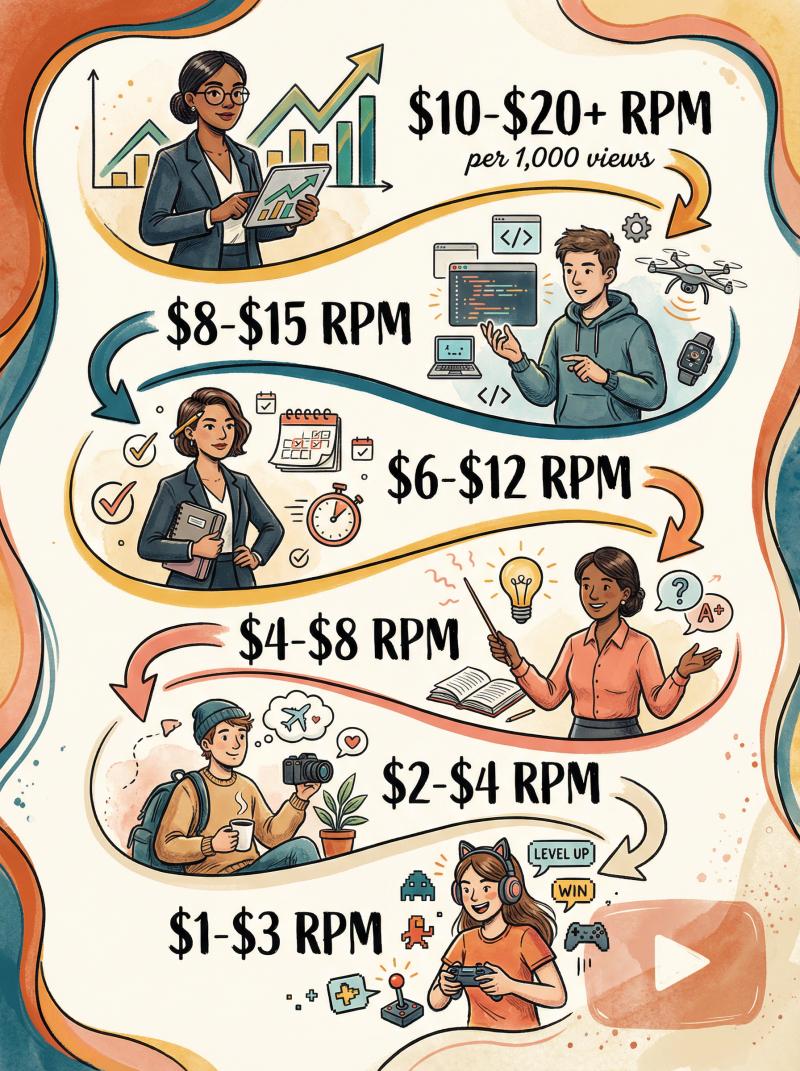
Average earnings: Most creators see around $3-$5 per 1,000 monetized views (YouTube's typical RPM).
High-CPM niches like finance or software can hit $10-$20+ per 1,000 views. Entertainment and gaming channels might see $1-$2.
Average YouTube Earnings by Niche
Content Niche - Typical RPM (per 1,000 views) - Why?
- Finance/Investing - $10-$20+ - High advertiser demand, premium audiences
- Software/Tech - $8-$15 - Business buyers, high-value products
- Business/Productivity - $6-$12 - Professional audiences, good ad rates
- Education/Tutorials - $4-$8 - Moderate advertiser interest
- Lifestyle/Vlogs - $2-$4 - Broader audience, lower ad rates
- Gaming/Entertainment - $1-$3 - Saturated market, younger demographics
Critical note: You only earn when viewers actually see ads. Ad blockers, Premium subscribers (different revenue stream), and viewers who skip ads don't generate ad revenue.
YouTube Premium Views
When Premium subscribers watch your content, you get a share of their subscription fee proportional to watch time.
This generates small amounts per view (fractions of a cent), but it adds up if you have significant Premium viewership.
Shorts Ad Revenue
Starting in 2023, YouTube introduced ad revenue sharing for Shorts creators in YPP.
The model is complex (pooled revenue split among creators), and payouts per Shorts view are much lower than long-form (often fractions of a penny). Still, millions of Shorts views can generate meaningful income.
Fan Funding (Memberships, Super Chats, Super Thanks)
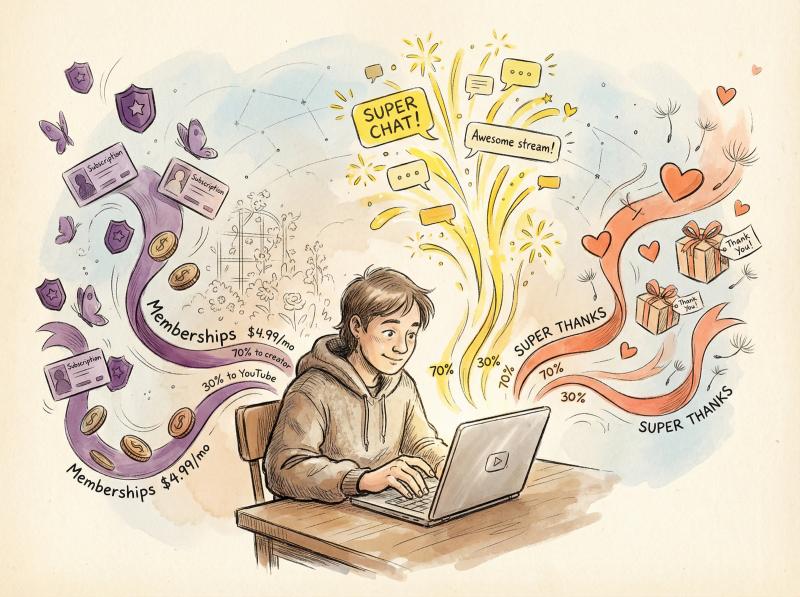
Channel Memberships: Viewers pay monthly subscriptions (typically $4.99+) for special perks. YouTube takes 30%; you keep 70%.
If 100 members pay $4.99/month, that's ~$350/month for you.
Super Chat & Super Stickers: During live streams, viewers pay to highlight their messages. YouTube takes 30%; you keep 70%.
Super Thanks: A tip button on regular videos where viewers can send one-time payments. Same 70/30 split.
These are all audience-driven, so income fluctuates based on fan generosity and community size.
Other Revenue Avenues
- Merch Shelf: Integrate merchandise below your videos (if you have 10k+ subs). Revenue comes from your merch vendor, not AdSense.
- YouTube Shopping & Affiliate: Tag products in videos and earn commissions on sales. Available for eligible creators with 20k+ subs in the official program.
- Brand Sponsorships: Not part of YPP, but having a monetized channel makes you more attractive to sponsors who pay directly for integrations.
Which pays most?
For most creators, ad revenue is the primary income stream. But channels with tight communities can rival or exceed ad earnings through memberships and Super Chats.
Education and finance channels often earn well from ads due to high CPMs. Gaming streamers might make more from viewer donations than ads.
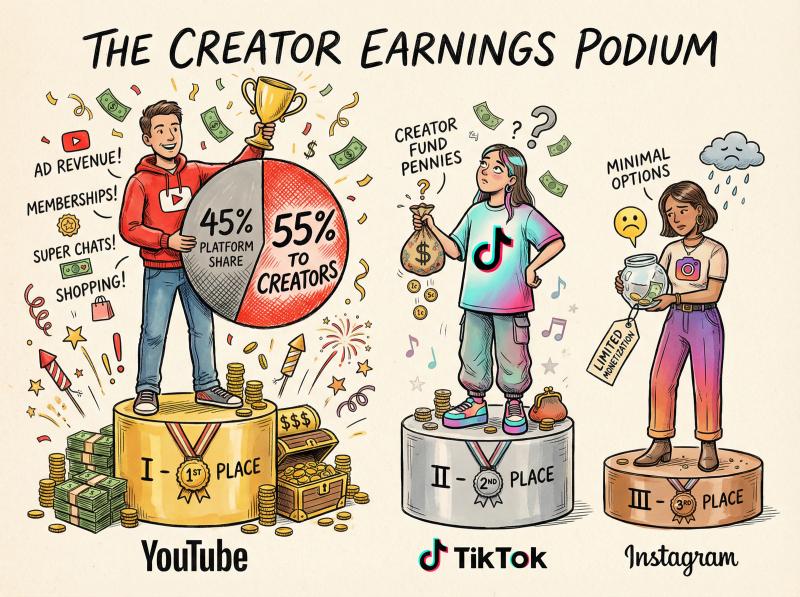
Compared to other platforms, YouTube offers significantly better revenue potential. YouTube's 55% ad share beats TikTok's creator fund payouts and Instagram's limited monetization options.
For context on what other platforms pay, check out our comprehensive guide on what social media platform pays the most.
But you still need serious view counts to generate meaningful income.
How to Reach YouTube Monetization Faster (Proven Tactics)
Meeting YPP requirements isn't easy. Here's how to speed up the journey:
Create Content That Racks Up Watch Hours
4,000 hours is a big hurdle. Focus on:
Longer videos when appropriate: A 10-minute video generates more watch time than a 2-minute video if you keep viewers engaged.
Streaming live or hosting premieres also racks up hours quickly.
Content that retains viewers: Use YouTube Analytics to see where viewers drop off, then improve your intros, pacing, and storytelling.
Mix Shorts with long-form: Shorts can drive subscribers and channel discovery, but they won't help you hit 4,000 hours.
Shorts views don't count toward watch time, so you need long-form videos in your content mix.
Consistent Upload Schedule
Regularity matters more than volume.
Weekly or biweekly uploads (at minimum) keep viewers coming back and signal to YouTube's algorithm that you're an active creator.
Optimize for Discovery
Thumbnails and titles: High click-through rates mean more views and more watch time. Test different thumbnail styles and headline formulas.
SEO basics: Use descriptions, tags, and video chapters strategically. If someone searches your topic, you want to show up.
Playlists: Auto-play keeps viewers watching multiple videos, multiplying your watch hours.
Build Community Engagement
Encourage subscriptions with clear calls-to-action. Reply to comments to signal engagement.
Create a channel trailer explaining why people should subscribe.
Engaged subscribers watch more content, which boosts hours and helps you hit thresholds faster.
Cross-Promotion Across Platforms
Don't rely solely on YouTube's algorithm for discovery. Promote your videos on other platforms:
- Share video links on X/Twitter, Instagram, TikTok, LinkedIn, Facebook
- Embed videos in blog posts or newsletters
- Collaborate with other creators for cross-audience exposure
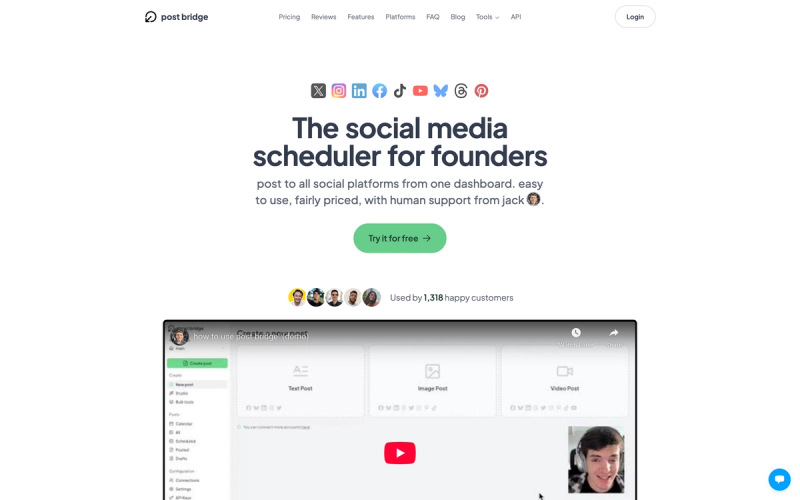
This is where a tool like Post bridge becomes useful.
Instead of manually posting video links to nine different social platforms, you can schedule or instantly publish from one dashboard.
When you upload a YouTube video, Post bridge lets you share it across X, Instagram, Facebook, LinkedIn, TikTok, Threads, Pinterest, Bluesky, and YouTube simultaneously.
That cross-platform promotion drives more initial traffic, which signals to YouTube's algorithm that your content is worth recommending.
You can also promote manually or use other scheduling tools. The key is actually doing the cross-promotion, not skipping it because it feels tedious.
Study Your Analytics Obsessively
YouTube Analytics shows you what's working:
- Which videos get the most watch time?
- Where do viewers drop off?
- Which traffic sources convert best?
Use this data to double down on what works and cut what doesn't. Hitting 1k/4k is as much about retaining viewers as attracting them.
Reality Check: Don't Start YouTube Purely for Money
Reaching monetization can take months or years.
Channels that succeed are usually run by people who genuinely enjoy creating content and building community. If you're passionate about your niche, that enthusiasm shows in your videos and attracts viewers.
Chasing a paycheck without caring about the content leads to burnout before you hit the threshold.
Focus on the craft and the audience first. The earnings will follow.
Frequently Asked Questions About YouTube Payment
Does YouTube pay you for views if you're not in the Partner Program?
No. Without YPP, YouTube doesn't share ad revenue with you, period.
A video with 1 million views earns you $0 if your channel isn't monetized. You might make money indirectly (like promoting a product or landing a sponsorship), but YouTube itself won't pay you until you join YPP.
If I meet the 1k/4k requirements, am I guaranteed approval?
Usually, yes.
Most channels that hit the numeric thresholds and follow YouTube's guidelines get approved. However, if your content is borderline (heavy reliance on reused content, unclear rights, topics advertisers avoid), YouTube reviewers might deny your application.
If that happens, you can make changes and reapply after 30 days.
Does YouTube pay more for likes, comments, or having more subscribers?
No. Likes and comments don't directly generate revenue.
You don't get paid per subscriber. These metrics help indirectly (a video with high engagement might get promoted more, leading to more views and ad revenue), but there's no direct monetization from a thumbs-up or a subscriber count.
Think of engagement as a means to an end. It helps you grow, which leads to more monetized views.
Can I get demonetized if my numbers drop after joining YPP?
YouTube typically doesn't remove you from YPP for dropping below 1,000 subs or 4,000 hours after you're in.
Metrics fluctuate, and they understand that.
However, YouTube can demonetize or remove you from YPP if you violate policies (community guidelines, advertiser-friendly content rules, etc.).
Also, if your channel goes completely dormant for 6+ months with minimal activity, there's a policy that YouTube may remove you from the program.
A temporary dip in subscribers or watch time won't automatically kick you out. But policy violations will.
How much will I earn per view or per subscriber?
Earnings are primarily per view (specifically per ad view).
A rough average is $0.003 to $0.005 per view on monetized content, which equals $3-$5 per 1,000 views. But this varies wildly by niche and audience.
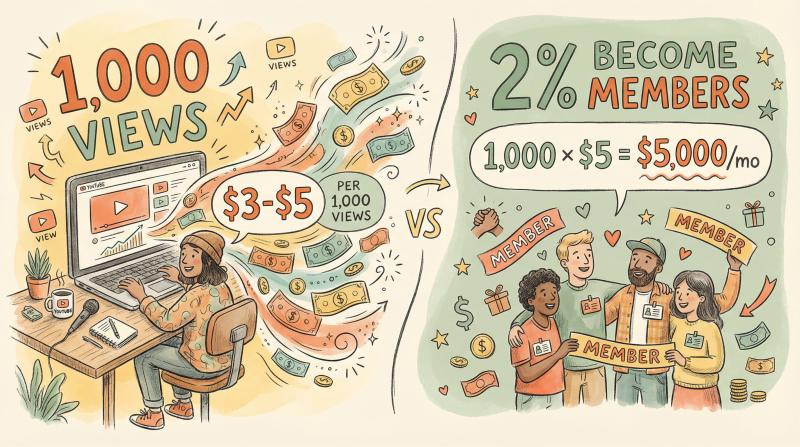
Subscribers don't pay you anything directly. They simply make it more likely that your new videos get watched by a loyal base, which translates to views and ad impressions.
If you enable memberships, subscribers can become paying members. For example, if 2% of 50,000 subscribers join a $5/month membership, that's 1,000 members × $5 = $5,000 gross per month.
Your cut after YouTube's 30% would be around $3,500/month. But that conversion rate is just an example. Results vary dramatically.
Are there other ways to monetize before hitting YPP requirements?
Yes, but not through YouTube itself.
Many creators use platforms like Patreon, Ko-fi, or Buy Me a Coffee to ask viewers for support before they're eligible for YPP. You can also do affiliate marketing (promote products with special links and earn commissions) or sell digital products.
These methods don't require YouTube's approval. You just need an audience willing to support you or interested in what you're selling.
But it's challenging to monetize a very small channel. People typically support creators they already trust and value.
When should I expect my first YouTube payment after monetization?
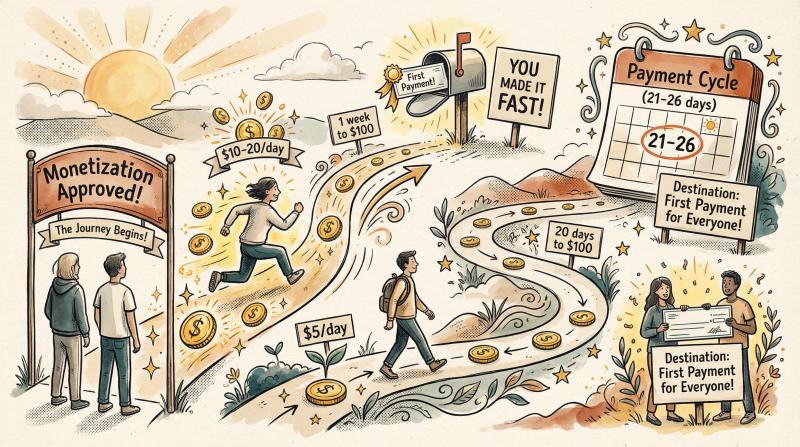
It depends entirely on how fast you earn.
If you're approved for YPP and immediately start earning $10-$20/day from ads, you'll hit $100 in about a week and get paid in the next payment cycle (21-26 days after the month your balance crossed $100).
If you're earning $5/day, it'll take 20 days to reach $100, meaning your first payment might arrive 2-3 months after approval.
Some channels blow past $100 in their first day. Others take many months.
The payment system itself is consistent once you hit the threshold.
How to Manage Your YouTube Workflow at Scale
Once you're monetized and growing, the real challenge becomes consistency.
You're creating videos, managing community comments, tracking analytics, and promoting across multiple platforms.
This is where automation and workflow tools become essential. Manually posting video links to X, Instagram, Facebook, TikTok, LinkedIn, Threads, Pinterest, Bluesky, and YouTube every time you upload is time-consuming and error-prone.
Post bridge handles multi-platform posting from one dashboard.
Upload your video link and caption once, select your target platforms, and schedule or post instantly. You can connect up to 30 social accounts (depending on your plan) and publish everywhere without switching tabs or logging into nine different apps.
Key features for YouTube creators:
① Multi-platform scheduling: Post to 10+ networks simultaneously or queue content for later
② TikTok draft uploads: Schedule TikTok content directly (not just links)
③ YouTube Shorts detection: Automatically recognizes and formats Shorts correctly
④ Simple interface: No complex training, no enterprise bloat, just straightforward scheduling
Pricing starts at $9/month for 5 social accounts (unlimited posts), with Creator ($18/month, 15 accounts) and Pro ($27/month, 30 accounts) tiers available. Annual billing knocks 40% off.
You can also access the API in closed beta if you want to automate posting programmatically (pricing is $0.05 per scheduled post on top of a Pro subscription).
Obviously, there are other scheduling tools out there. But Post bridge positions itself as the indie alternative: cheaper, simpler, and focused on creators rather than enterprise teams.
For YouTube creators managing multiple social platforms, it's worth exploring.
And if you prefer manual posting, that works too. The key is having some system so cross-promotion doesn't fall through the cracks.
For more tips on maximizing your reach, check out our social media best practices guide.
The Bottom Line
YouTube starts paying you when you:
1. Get accepted into the YouTube Partner Program (1,000+ subscribers + 4,000 watch hours in 12 months OR 10 million Shorts views in 90 days)
2. Turn on monetization and start earning from ads, Premium views, memberships, Super Chats, etc.
3. Accumulate at least $100 in total AdSense earnings (the payment threshold)
4. Complete all tax and payment setup in your AdSense account
5. Wait for the next monthly payment cycle (typically around the 21st-26th of each month)
The first payment could arrive a few weeks or a few months after monetization approval, depending on how quickly you earn.
Once you're consistently above the $100 threshold, you'll receive monthly payments.
Getting to that point requires consistency, quality content, audience engagement, and often months or years of effort. But the payoff is real: YouTube offers one of the best revenue-sharing models among social platforms, and monetized creators can turn their channels into sustainable income sources.
For more insights on creator earnings across platforms, explore our guides on how much YouTube pays for 1,000 views and YouTube earnings in India.
Focus on creating content you care about, building a community, and hitting those YPP thresholds.
The money will follow. Good luck on your road to monetization.