
![Why Is My TikTok Not Getting Views? [The 2026 Fix]](/_next/image?url=https%3A%2F%2Fcdn.sanity.io%2Fimages%2Ft7q38azc%2Fproduction%2Fd5bf0fa433b49e75effb84cb5075847fd31999d9-2752x1536.png&w=3840&q=75&dpl=dpl_3WvTxbBqVjaQns2ANzZKKBzi75aJ)
You posted a TikTok. You waited. You checked again. Still 0 views.
Or maybe you're getting 50 views when you used to get 5,000. Either way, something's wrong, and the guessing game is exhausting.
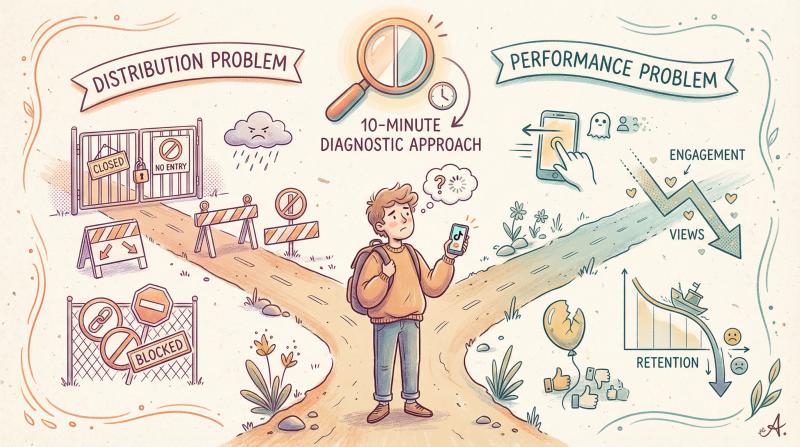
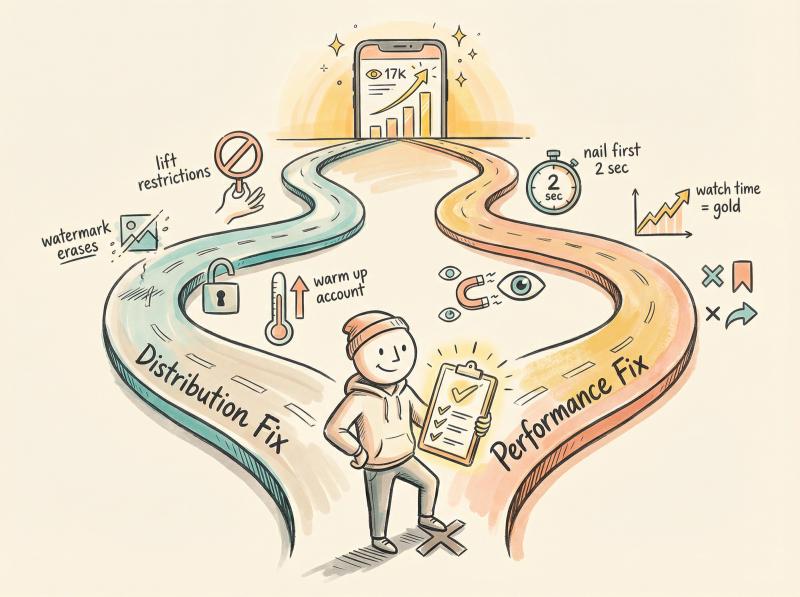
Here's what most creators don't realize: when your TikTok views tank, you're almost always dealing with one of two distinct problems. There's the distribution problem (TikTok isn't really showing your video to people) and the performance problem (TikTok is showing it, but viewers swipe away so fast that the algorithm kills distribution).
Mix up which problem you have, and you'll waste weeks fixing the wrong thing.
This guide will help you diagnose your exact issue in under 10 minutes, then give you the specific fixes that actually work in 2026. No vague advice. No "try random hashtags and pray" strategies. Just a clear troubleshooting playbook built from TikTok's own documentation, platform updates, and what's actually working right now.
Why Your TikTok Videos Aren't Getting Views: The 2 Problems
Before you change anything, understand the distinction:
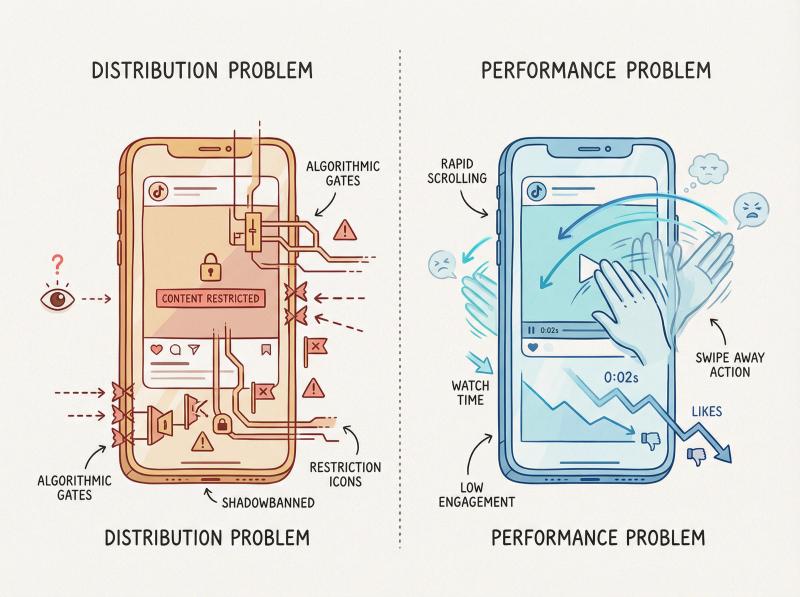
Distribution Problem: TikTok's system isn't distributing your content. This could be account restrictions, content flags, technical issues, or automation triggering spam filters. Your video might be shown to literally nobody, or only to your existing followers. The content quality doesn't even matter here because people aren't seeing it.
Performance Problem: TikTok is testing your video with small audiences, but viewers don't engage. They swipe away in the first 2 seconds. Nobody likes, comments, or watches to the end. The algorithm interprets this as "people don't want this" and stops showing it to more people.
The fix for a distribution problem looks nothing like the fix for a performance problem.
Here's how to figure out which bucket you're in.
How to Check Why Your TikTok Has 0 Views in 10 Minutes
Run through these checks before you change a single thing about your content strategy.
TikTok Account Check Location:
To check if your account is restricted, follow this exact path:
- Profile → Menu (☰)
- TikTok Studio
- More Tools → Account Check
The Account Check feature will explicitly show you if your account has any restrictions on posting, commenting, or profile editing. This is TikTok's official restriction checker - it's not hidden, most creators just don't know it exists.
Is My TikTok Video Actually Public?
Sounds obvious, but it's common. Go to your profile and verify:
- Your account isn't set to private (unless that's intentional for a personal account)
- The specific video's visibility is set to "Everyone" (not "Friends" or "Only me")
- You didn't accidentally save it as a draft instead of posting it
To check account privacy: Profile → Menu (☰) → Settings and Privacy → Privacy. Make sure "Private account" is toggled off if you want public reach.
For individual video visibility: open the video, tap the three dots, check "Who can watch this video." it should say Public if you want maximum reach.
If your account or video was private, switching it to public should immediately allow new viewers to find your content. If you're under 16, note that TikTok sets accounts to private by default.
How to Check If Your TikTok Account Is Restricted
TikTok has an official tool that shows you if something is wrong with your account. It's not hidden. Most creators just don't know it exists.
Path: Profile → Menu (☰) → TikTok Studio → More Tools → Account Check
This feature explicitly shows you if you're restricted from posting, commenting, editing your profile, or other actions. TikTok's own support documentation confirms this is where restriction information lives.
Note: TikTok's official Account Status documentation page could not be captured automatically due to regional geo-blocking or temporary network restrictions. The link above takes you directly to TikTok's support article that explains how Account Check works and what each restriction type means. This is the authoritative source for understanding TikTok's account health system.
If you see warnings here, you're in the distribution problem bucket. Don't optimize your content yet. Fix the restriction first.
Am I Shadowbanned on TikTok? How to Actually Check
This is the closest thing to what creators call a "shadowban," and it's a real, documented TikTok feature.
TikTok explicitly states that accounts can become ineligible for recommendation, meaning your posts won't appear in For You feeds and will be harder to find in search. This isn't a conspiracy theory. It's an official enforcement mechanism.
Note: TikTok's shadowban policy documentation could not be captured due to network restrictions, but the link above goes directly to their official support article explaining "Why is my account not being recommended?" This page confirms that TikTok's "ineligibility for recommendation" status is real and shows you how to check for it and appeal.
You'll be notified if this happens. The notification appears in your inbox and also under your username on your profile page. From there, you can appeal.
What the "Shadowban" Actually Looks Like:
If your account is ineligible for recommendation, TikTok tells you directly in two places:
- Your Profile: Under your username, you'll see "ineligible for recommendation" with an "Appeal" button
- Your Inbox: A notification explaining the restriction with "View More" → "Appeal" options
This is TikTok's official enforcement mechanism - it's not a secret invisible shadowban. If you don't see these notices, you're NOT shadowbanned. This notice requires an authenticated TikTok session to view, but now you know exactly what to look for in your own account.
How to appeal:
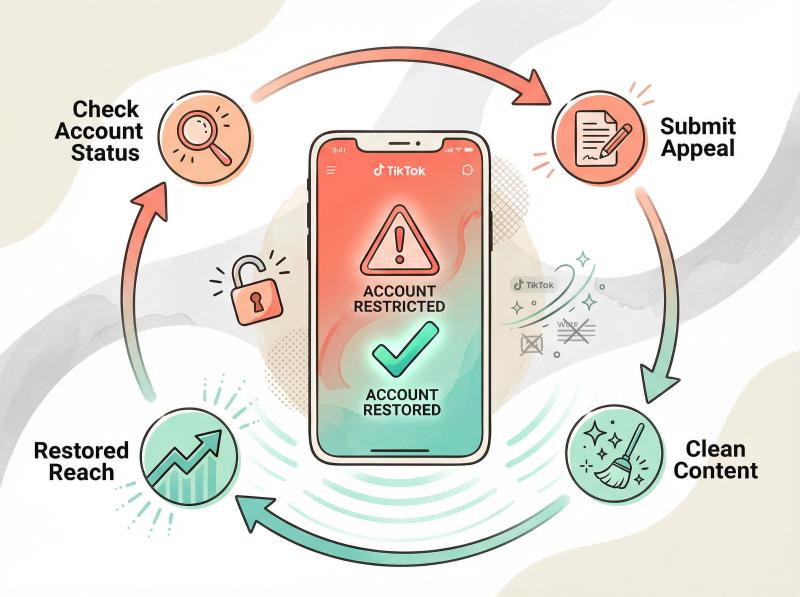
① Inbox → notification about ineligible account → View More → Appeal
② Or Profile → "ineligible for recommendation" notice under username → Appeal
If you're ineligible for recommendation, stop tweaking your hooks and hashtags. Your content isn't being shown to anyone. Focus on the appeal process and cleaning up whatever triggered the flag.
Is My TikTok Video Blocked from For You Page?
Even if your account is fine, individual posts can be flagged as ineligible for the For You feed. The post stays up on your profile, but nobody discovers it organically.
How to check: open the video → Analytics (or three dots → View Insights) → look for a notification explaining ineligibility. If you see one, you can appeal directly from that screen.
TikTok also notes that content can be under review when first uploaded, when it suddenly gets popular, or if someone reports it. Review outcomes can include removal or ineligibility for For You.
If a specific video is restricted, you have two choices: appeal (if you think it's wrong) or remake the concept in a way that's more clearly guideline-safe.
Why Are My TikToks Age-Restricted?
TikTok uses something called "content levels" to classify videos. If your post is age-restricted, it might only be viewable by users 18+.
You can see this classification in the same place: video analytics → More Insights.
If you're unintentionally getting flagged as "mature," your reach just dropped to a fraction of TikTok's user base. This happens with edgy humor, implied violence, certain visual elements, or suggestive (but not explicit) content.
Fix: Make your next few videos squeaky clean. Avoid anything that could trip the mature content classifier. Over time, if your account builds a pattern of clean content, TikTok's systems may treat your future posts differently.
How Long Does TikTok Take to Process Videos?
If you posted 20 minutes ago and you're freaking out about 0 views, pump the brakes.
TikTok's view counts and analytics aren't real-time. Research shows that TikTok analytics typically refresh about once a day and creators should give new posts at least 24 hours before judging performance.
TikTok's own help center basically says the same thing: if views fluctuate, use the analytics dashboard to understand performance over time.
If it's been less than a few hours, you might just be looking at processing lag or delayed analytics. Come back tomorrow before you assume the worst.
How to Fix TikTok Distribution Problems (Account Restrictions)
If your diagnostic audit showed restrictions, ineligibility notices, or content flags, you have a distribution problem. Here's how to fix each specific type.
My TikTok Account Says "Ineligible for Recommendation" - How to Fix It
What it means: Your account is essentially unlisted for For You feeds and harder to find in search until the issue is resolved.
Why it happens: TikTok states that repeatedly posting content unsuitable for the For You feed can cause your account and posts to not appear in For You. This isn't guesswork. It's directly from their documentation.
The platform has also publicly discussed applying strict eligibility standards and "interrupting" frequent recommendation of certain content types, even if the content isn't outright removed.
What to do:
① Open the ineligibility notice (inbox or profile page). Don't guess which video caused this. Let TikTok show you.
② Review the flagged content. Was it actually borderline? Or is this a false positive?
③ Submit an appeal through the in-app flow if you genuinely think it's wrong.
④ Stop posting anything remotely controversial while you're appealing. Don't stack more strikes.
⑤ If the appeal is denied or you realize the content was pushing guidelines, private or delete the problematic videos. Then post squeaky-clean content for at least a week.
Many creators report that ineligibility can last days to two weeks. If you continuously post guideline-safe content and avoid further strikes, your reach should gradually return.
How to Fix Individual TikTok Posts Blocked from For You
What it means: That specific video is effectively "followers only" plus whatever profile traffic you can drive manually.
What to do:
- Open the video → Analytics/More Insights → read the exact reason TikTok gives → appeal if you think they're wrong.
If it's clearly a policy/eligibility issue and the appeal fails, don't keep beating a dead horse. Remake the concept with safer framing. Same core idea, different packaging.
Example: If you made a video about "dangerous viral challenges" and it got flagged, try "5 viral challenges that went wrong (and what creators learned)" with less graphic footage. Position it as educational with clear safety messaging.
Why Does TikTok Block Videos with Watermarks?
TikTok wants original content. If your video has visible watermarks from other platforms (Instagram, YouTube Shorts logos) or heavy branding overlays, the algorithm will likely suppress it.
This isn't speculation. TikTok's commerce policy language is blunt: visible watermarks or superimposed logos are an indicator of unoriginal content.
Even TikTok's developer guidelines explicitly state that API clients should not add promotional watermarks or logos to creators' content.
Fast fixes:
- Upload from the clean original export, not a downloaded repost from another platform
- Remove QR codes and giant "follow me on Instagram" overlays
- Don't recycle the exact same clip with tiny edits 20 times
If you've been cross-posting with watermarks, go back to your video editor. Export clean versions for each platform. Yes, it's extra work. But watermarked content gets stuck at 0-10 views on TikTok because the system recognizes it as recycled.
My TikTok Video Is Stuck Processing - What to Do
Sometimes the issue is just technical. TikTok's developer docs mention it can take a few minutes for published content to process and become fully visible on a profile.
Basic troubleshooting checklist:
- Update the TikTok app (Settings → About → Check for updates)
- Clear app cache (phone settings → TikTok → Clear cache)
- Check your internet connection (slow connection = slow processing)
- Disable VPN if you're using one (VPNs can sometimes cause posting issues)
- Restart the app or your phone
If your app is legitimately bugging out (feed not loading, crashes, weird UI behavior), standard app troubleshooting actually matters. Update, reinstall if needed, check your phone's OS version.
Technical glitches usually resolve within a day. If TikTok's having a wider outage, you'll see it on Downdetector. If your other videos are posting fine but one specific video is stuck, it's likely under review or flagged, not a technical issue.
How to Fix TikTok Performance Problems (Low Engagement)
If your diagnostic audit came back clean (no restrictions, no flags, videos are public), you have a performance problem. TikTok is showing your content to small test audiences, but they're not engaging.
Here's why that happens and how to fix it.
How Does the TikTok Algorithm Work in 2026?
TikTok is a recommender system. It tries to show each viewer the next video they're most likely to watch and enjoy.
TikTok explains it uses recommender systems to suggest content based on your preferences expressed through interactions (following, liking, watching, etc.).
Third-party analyses consistently identify three big signal groups:
| Signal Category | What It Includes |
|---|---|
| User interactions | watch time, completion rate, likes, shares, comments, "not interested" taps |
| Video information | captions, hashtags, sounds, effects |
| User/device info | language, country, device type/settings |
And critically: watch time is repeatedly treated as one of the most important engagement signals.
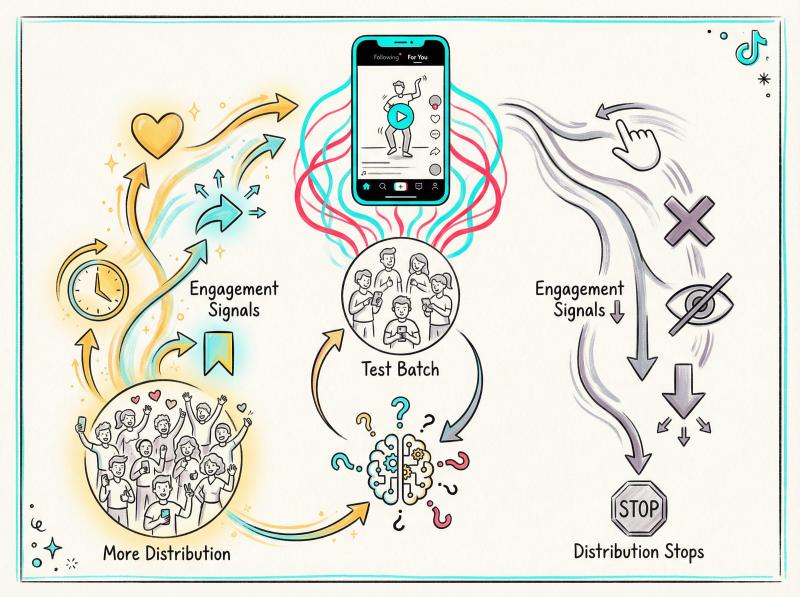
So if your video gets shown to 100 people but 90 of them swipe away in the first 2 seconds, the algorithm learns: "people don't want this." That's not personal. It's math.
The algorithm tests your video with a small batch first. Research shows that if content performs well initially, TikTok may expand it to a larger audience, but the next boost depends on how that audience reacts.
Every stage is earned. If viewers consistently bail early, distribution stops.
How to Make TikTok Videos That Get Views: Fix Your First 2 Seconds
You need one clear job in your opening: make the viewer feel like staying is worth it.
No throat clearing. No "hey guys, welcome back." no logo animations. Those are reasons to leave.
Hook templates that work:
- "here's the mistake you're making with ___"
- "do this before you buy ___"
- "I tried ___ for 7 days. Here's what happened."
- "3 steps to ___ (step 2 is the one everyone skips)"
Open with a promise of value or a curiosity gap. If someone can't tell what they're about to learn or see within 2 seconds, they're gone.
Test this: watch your video with the sound off. Can you tell what it's about immediately? If not, add on-screen text that states the promise clearly.
Why People Don't Watch My TikTok Videos to the End
Confusion kills watch time faster than bad content does.
Common confusion triggers:
- Viewer can't tell what the video is about (no on-screen context, vague opener)
- Audio doesn't match visuals (feels like spam or a content farm)
- The "point" arrives too late (30 seconds of setup for a 10-second payoff)
Fix: Add on-screen text that states the value proposition immediately. Think of it like a newspaper headline. You're competing with infinite scroll. Remove any friction that makes people think "wait, what is this?"
How to Structure TikTok Videos for Maximum Watch Time
People keep watching when they feel they're moving forward toward a payoff.
Easy structures that work:
- Problem → Why it happens → Fix
- Step 1 / Step 2 / Step 3
- Before → After → How
Even a 15-second video can have a narrative arc. Don't just show something. Build toward a conclusion or reveal.
Example: Instead of "here are 5 tips" (which feels like a flat list), try "here's why your tips aren't working → what you're missing → the 1 tip that actually fixes it." Same information, different structure. The second one creates forward momentum.
How to Get More Saves and Shares on TikTok (Not Just Likes)
Likes are cheap. They cost a viewer zero mental effort. Saves and shares usually mean real value.
Add simple value triggers that make people want to save or share your video:
- Checklists they'll want to reference later
- Scripts or templates they can use
- Step-by-step guides that require multiple viewings
- "comment 'guide' and I'll send the steps" (then actually do it)
The algorithm watches for these high-value engagement signals. Research shows that TikTok tests content with a small audience first, and if that audience saves or shares it, the next wave of distribution kicks in.
Saves signal "this was useful enough to revisit." shares signal "this was valuable enough to recommend to someone I know." both tell TikTok your content has legs.
How to Use TikTok SEO to Get More Views in 2026
TikTok has increasingly behaved like a search engine, with industry experts noting the platform's shift toward using TikTok SEO as a key lever for reach.
In 2025-2026, TikTok's algorithm shifted to place greater emphasis on search intent, keywords, and niche authority. The platform now behaves more like YouTube or Google, where users actively search for content and the algorithm uses keywords to serve relevant results.
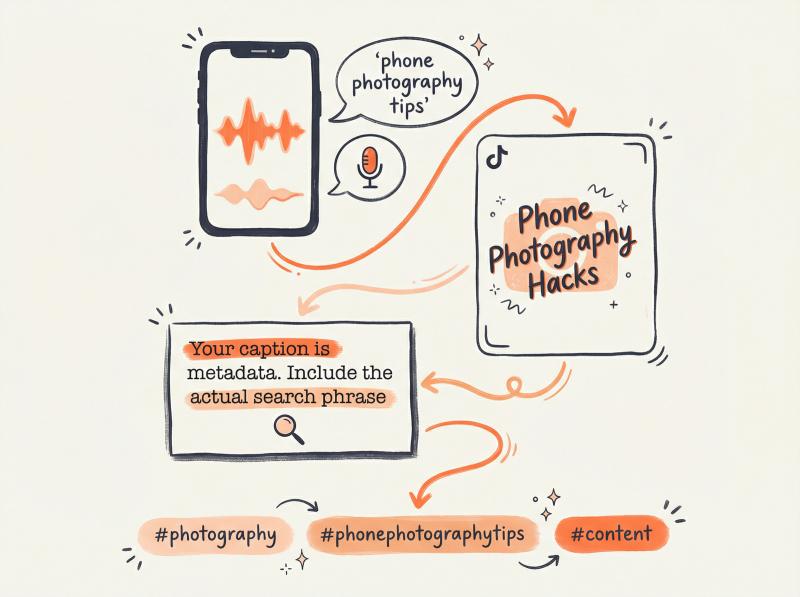
Practical SEO stack for TikTok:
| SEO Element | Implementation | Why It Matters |
|---|---|---|
| ① Say the keyword out loud | If you're making a video about phone photography tips, say "phone photography" or "how to take better phone photos" audibly in the video | TikTok's AI transcribes your audio |
| ② Put the keyword on screen | Add "Phone Photography Hacks" as a title overlay | TikTok's AI can read text in your video |
| ③ Put the keyword in the caption | Your caption is metadata. Include the actual search phrase | TikTok matches search queries to captions |
| ④ Use relevant hashtags | Don't spam 30 hashtags. Use 2-3 strategic ones. Mix one broader tag (like #photography) with one niche tag (like #phonephotographytips) | Avoid irrelevant trending tags just because they're trending - that confuses the algorithm |
You're trying to answer: "what would someone type in the search bar to find this?"
Make sure your answer appears in the audio, visuals, caption, and tags. TikTok's algorithm reads all of it.
How Often Should You Post on TikTok to Get More Views?
Distribution isn't just about individual video quality. Your overall posting pattern matters too.
How Many Times Should I Post on TikTok Per Week?
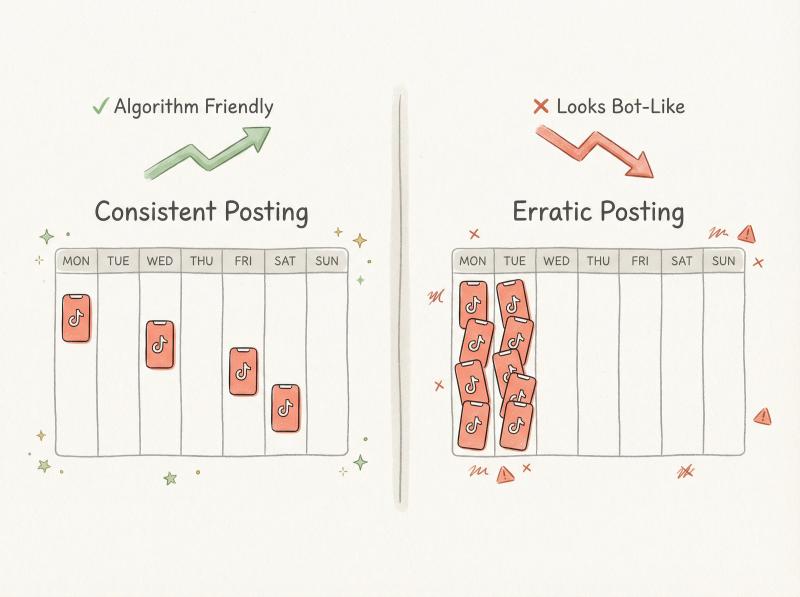
Industry best practices suggest publishing consistently, with "ideally 3 to 5 times per week" as a baseline for most creators.
Don't post 12 times today and disappear for 3 weeks. That pattern looks bot-like to the algorithm and also trains followers to expect inconsistent content.
Pick a pace you can sustain. If that's 2x per week, fine. If it's daily, great. The rhythm matters more than the frequency.
TikTok rewards accounts that show up regularly because consistent posting signals "this creator is active and engaged." it's the opposite of what abandoned or spam accounts do.
What's the Best Time to Post on TikTok?
Yes, timing matters. If you post when your audience is asleep, your first hour of engagement will be weak.
But it's not a cheat code. If your content holds attention, it'll travel. TikTok's For You algorithm can resurface a video hours or even days later if it starts performing well.
How to optimize timing:
- If you have a Pro/Business account, check Analytics → Followers → Activity to see when your audience is most active.
- As a general rule, evenings (after work/school) and weekends see higher activity, but this varies by niche.
- Experiment. Post at different times and track which ones give you the best early engagement. Then bias toward those windows.
If you're managing content across multiple platforms, scheduling tools like Post Bridge let you queue TikTok posts at optimal times without manually logging in at 7pm every night. But timing is tertiary to content quality. Nail the content first.
How to Test What Works on TikTok
Don't just post and hope. Run controlled experiments:
Test structure:
- Same topic, 5 different hooks (test which hook gets highest completion rate)
- Same hook, 3 different endings (test which drives most comments)
- Same video, different on-screen text framing (test which drives most saves)
Look at your analytics 24-48 hours after each post. Which version actually increased average watch time and completion rate? Double down on that pattern.
Most creators post randomly and wonder why results are random. Treat it like A/B testing. You'll learn faster.
TikTok Shadowban: What's Real vs What's Fake
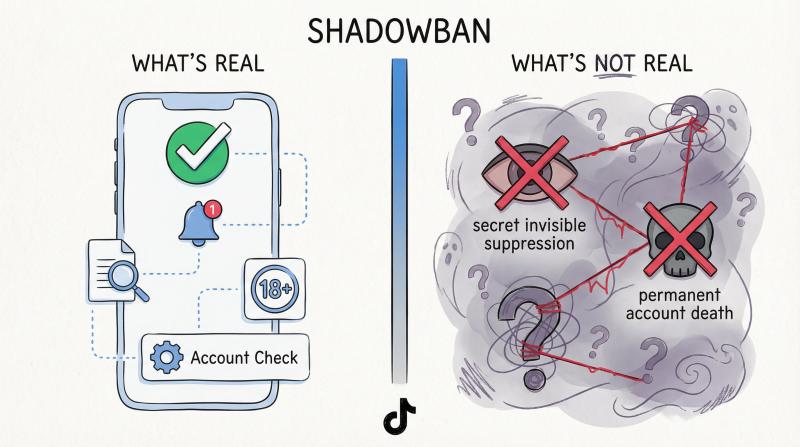
People use "shadowban" to mean about five different things. Let's separate fact from cope.
What's real (and visible in TikTok's app):
✓ Account ineligible for recommendation (documented by TikTok)
✓ Post ineligible for For You + appeal path (documented here)
✓ Age restriction/content levels (documented here)
✓ Content under review (documented here)
✓ Account restrictions shown in Account Check (documented here)
*What's not real:*
✗ A secret invisible suppression that you can't check
✗ Permanent account death from one borderline video
✗ Shadowbans based on your follower count or competitor reports (without actual guideline violations)
If you don't see any of those official restriction notices, you're probably not shadowbanned. You're just losing the retention game.
The difference matters. If you're actually restricted, you need to appeal and clean up content. If you're just getting low engagement, you need better hooks and watch time.
Don't blame a shadowban when the real issue is that viewers swipe away in 3 seconds.
Can Using a TikTok Scheduler Hurt Your Views?
This section is critical if you use (or want to use) scheduling tools to manage your TikTok content.
Why New TikTok Accounts Get 0 Views with Automation
Here's the uncomfortable truth: using API posting before your account is established can result in zero views on your content.
It's not that automation always kills reach. It's that new or cold accounts + automated-looking behavior triggers extra scrutiny from TikTok's systems.
TikTok's developer guidance notes that published content may take a few minutes to process and become visible. But on a brand-new account, connecting third-party tools immediately can make TikTok think "this is a bot."
Even creators who use official API tools (like Post Bridge) report that jumping straight to automation on day one often results in videos getting 0 views. The content never gets distributed because the account hasn't built trust yet.
How to Warm Up a New TikTok Account Before Using Schedulers
From Post Bridge's troubleshooting documentation (based on patterns they've seen across thousands of creators), the fix is: warm up new accounts before automating.
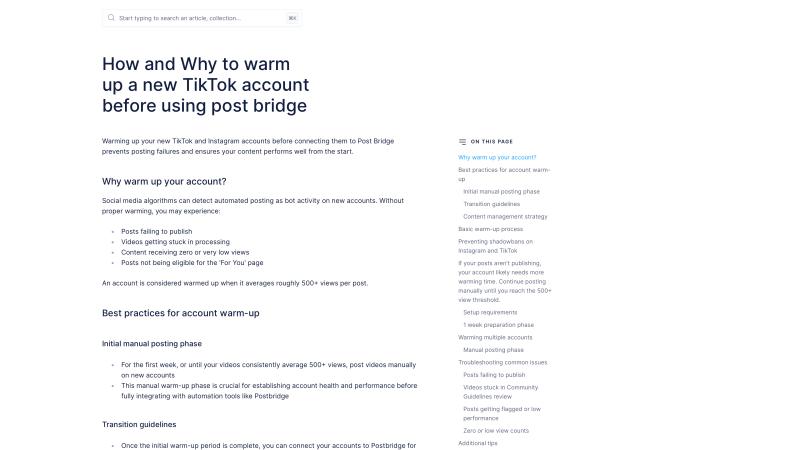
How to warm up a TikTok account:
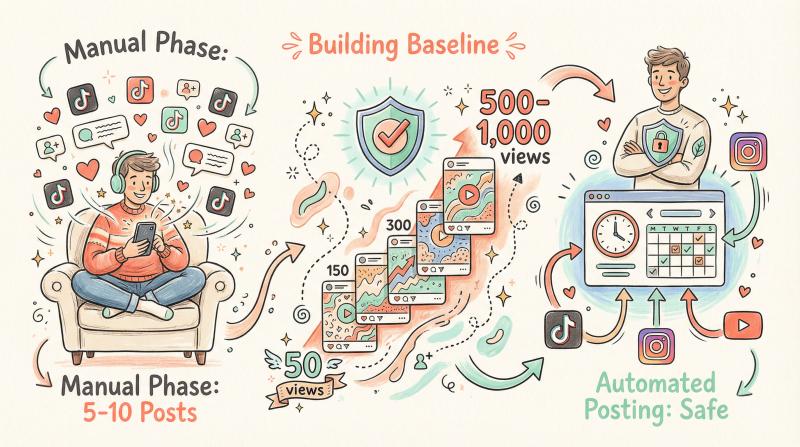
① Post manually for an initial period
Use the TikTok app directly. Don't connect schedulers or third-party tools yet. Aim for at least 5-10 videos posted manually over 1-2 weeks.
② Behave like a normal human on the platform
Watch videos in your niche. Like content. Leave genuine comments (not spam). Follow a few relevant creators. Show TikTok's systems that you're a real person engaging with the community.
③ Avoid automation until the account shows consistent baseline views
An account is considered "warmed up" when recent posts average roughly 500-1,000 views consistently. Until you hit that range organically, keep posting manually and interacting on the app.
Once you've built that baseline, then you can gradually introduce scheduling. Start with a mix (some manual, some scheduled) to ease the account into automated posting.
④ When you do connect a scheduler, ease into it
Don't immediately schedule 30 posts in advance. Post Bridge recommends scheduling 1-2 posts first, watching how they perform, then ramping up if views stay normal.
The warm-up isn't mystical. It's about proving to TikTok's systems that you're a legitimate creator before you start using efficiency tools.
How to Use Post Bridge for TikTok Without Hurting Reach
If you're managing content across multiple platforms (TikTok, Instagram, YouTube, LinkedIn, Twitter, Facebook, Pinterest, Threads, Bluesky), manually logging into each app every day isn't sustainable.
That's where Post Bridge comes in. It lets you upload a video once and schedule or instant-publish it to all nine platforms from one dashboard.
For TikTok specifically:
- Post Bridge offers a "save as draft" feature for TikTok posting. Instead of publishing directly via API (which some creators worry might trigger algorithmic penalties), you can push content as a draft in your TikTok account, then manually hit "Post" from the TikTok app. This gives you the efficiency of batch scheduling with the safety of manual publishing.
- TikTok requires a business account for API posting permissions. If you're on a personal account and want to connect Post Bridge, you'll need to switch to a business profile first (TikTok makes this easy in Settings).
- After your account is warmed up and consistently getting 500+ views, you can safely use Post Bridge to maintain that consistency without burning hours every week on manual posting.
The value prop: post once, schedule to 10 platforms, optimize posting times for each audience, and avoid the mental load of logging in to nine separate apps daily. Just make sure your TikTok account is warm before you turn on automation.
Can I Post the Same Video to Multiple TikTok Accounts?
If you're managing multiple TikTok accounts or posting the same content repeatedly, listen carefully.
Why You Can't Post the Same Content to Multiple TikTok Accounts
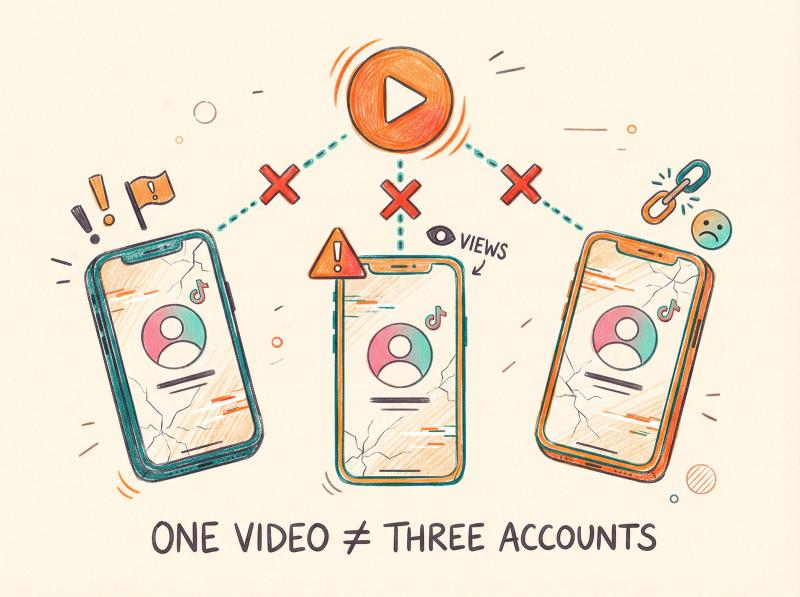
Post Bridge explicitly blocks posting the same post to multiple accounts on the same platform. Why? Because it can lead to spam flags, zero views, and worse.
TikTok's algorithm is designed to detect duplicate or near-duplicate content. If you try to post the exact same video to three different TikTok accounts simultaneously, TikTok will likely flag at least some of them.
The rule: one piece of content → one TikTok account. If you need to post similar content across multiple accounts (e.g., for different regions or niches), change the video enough that it's not a carbon copy. Adjust the hook, re-edit the footage, change the caption. Make each version unique.
Should I Post My TikTok Videos to Instagram and YouTube Too?
Don't confuse same-platform duplication with cross-platform posting. Posting the same core video to multiple platforms (TikTok, Instagram Reels, YouTube Shorts, etc.) is not only allowed, it's smart.
Post Bridge's workflow is built around uploading media once and distributing it across platforms. The key: you must upload the original media directly, not "repost an already-live TikTok." use your source files, not downloads from other platforms (which carry watermarks).
Why cross-posting matters: relying on one algorithm for all your reach is risky. TikTok could change tomorrow. Instagram Reels could suddenly prioritize different content. YouTube Shorts could become the dominant short-form platform in your niche.
Posting to multiple platforms simultaneously means you're not at the mercy of any single algorithm. If TikTok throttles your reach temporarily, your Instagram and YouTube audiences still see your content.
Post Bridge handles this exact workflow: upload once, schedule to all platforms, optimize each post for that platform's requirements (aspect ratio, video length limits, caption format). It's the "don't put all your eggs in one basket" strategy for creators and social media managers.
Step-by-Step: How to Fix TikTok Low Views Today
You've diagnosed the problem. You understand distribution vs performance. You know about warm-ups, restrictions, and algorithm mechanics.
Now here's the step-by-step sequence to fix your views.
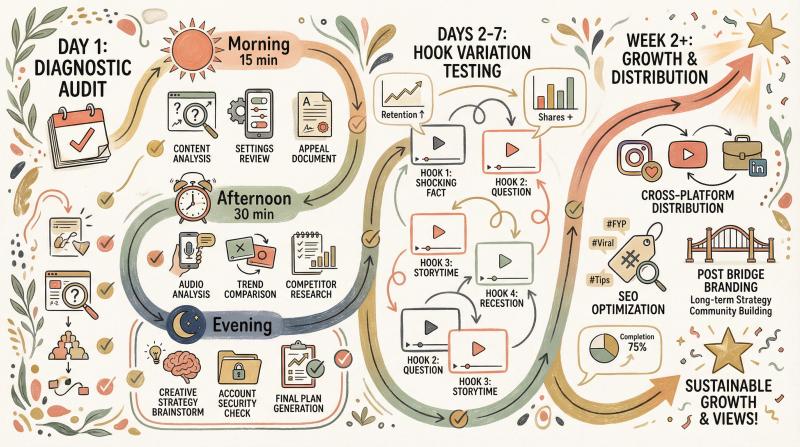
Day 1: Fix TikTok Distribution Problems
| Time Window | Action Steps |
|---|---|
| Morning (15 minutes) | ① run the 10-minute diagnostic audit from earlier in this guide<br><br>② check privacy settings, Account Check, ineligibility notices, and post-level restrictions<br><br>③ if you find restrictions, submit appeals immediately |
| Afternoon (30 minutes) | ④ clean up any obvious unoriginal content triggers (watermarks, QR codes, heavy branding overlays)<br><br>⑤ private or delete videos that clearly violated guidelines (if you've identified the problem content)<br><br>⑥ update TikTok app, clear cache, verify you're on a stable internet connection |
| Evening | don't post anything new today. if your account had restrictions, you want to give the appeal process time to work before you add more content to the mix. |
Days 2-7: How to Improve TikTok Video Performance
Daily posting strategy:
- Publish consistently. Pick a realistic cadence: 1x per day, 3x per week, whatever you can sustain. Research recommends 3-5 times per week as a solid baseline.
- Make 5 videos on one topic, each with a different hook. Test which hook gets the highest completion rate. This is how you learn what resonates.
- Judge winners after analytics stabilizes (give it ~24 hours). Don't panic if a video has 50 views after 2 hours. Come back tomorrow.
- Check your TikTok Analytics daily. Which videos held attention? Which ones got saves or shares? Double down on those patterns.
Content focus:
- Nail your first 2 seconds (use the hook templates from earlier)
- Add on-screen text immediately to state the value prop
- Remove confusion. Make it crystal clear what the video is about.
- Build toward a payoff. Use progress-based structures (problem → solution, step-by-step, before → after).
Week 2+: How to Scale TikTok Growth Without Losing Quality
Content strategy:
① Double down on the topics/hooks that held attention
If your video on "5 phone photography mistakes" got 2,000 views and high completion rate, make more phone photography content. The algorithm now knows people in that niche like your stuff.
② Add SEO intentionally
Use the keyword in speech, on-screen text, and caption. Include 2-3 relevant hashtags. Think like you're optimizing for search, not just hoping for viral luck.
③ Cross-post to reduce platform risk
Don't let one algorithm decide your success. Use your TikTok content on Instagram Reels, YouTube Shorts, LinkedIn, Twitter, and Facebook. Post Bridge makes this painless: upload once, distribute everywhere, schedule at optimal times for each platform.
④ Once your views are consistent (500-1,000+ per video), consider automation
If you're manually posting to 5+ platforms every day, you're wasting hours. After your accounts are warmed up, use a scheduler like Post Bridge to maintain consistency without burning out.
⑤ Keep testing
Never stop iterating. Try new hooks. Test different video lengths. Experiment with trending sounds (when they fit your content). Analyze what works. Repeat.
TikTok Views FAQs: Your Questions Answered
Why Do My TikTok Views Fluctuate?
Distribution is adaptive. Even TikTok's own help center points you to analytics to understand performance fluctuations.
Your views can fluctuate based on when you post, what else is trending at that moment, how the first batch of viewers reacts, and whether the algorithm decides to test your video with a broader audience. It's normal to see variance. Focus on trends over time, not individual video performance.
Does TikTok Tell Me If I'm Restricted?
Yes. Between Account Check, ineligibility notifications, and post-level "More Insights," TikTok provides specific information about restrictions.
You won't get a friendly email that says "you're shadowbanned," but if your account or content is restricted, TikTok shows you in the app. Check the locations listed in the diagnostic audit section.
Is "Shadowban" Real?
The word is unofficial, but the mechanics are real. TikTok has official systems for:
- Ineligible for recommendation (account-level)
- Ineligible for For You (post-level)
- Age restriction/content levels
- Content under review status
These are all documented, checkable states. If you don't see any of these notices, you're probably not restricted. You just need better content.
How Long Does TikTok Review Take?
Usually 1-2 hours, sometimes up to 24 hours for new or flagged content. If it's been less than a day, you might just need patience.
If it's been multiple days and your video is still at 0 views while your other recent posts are normal, the video might be restricted (not just under review). Check the More Insights on that specific video.
Can I Use Scheduling Tools Without Hurting My Reach?
Yes, if your account is warmed up first. Don't connect automation tools to a brand-new account with 0 posts.
Post manually for 1-2 weeks, build a baseline of 500-1,000 views per post, then start using tools like Post Bridge. The platform doesn't penalize official API use. It penalizes bot-like behavior on cold accounts.
Once your account has trust, scheduling tools save you massive amounts of time without hurting reach.
Should I Delete and Repost Videos That Got Low Views?
Usually no. If a video flopped, deleting and reuploading the exact same content won't change anything. TikTok can often detect duplicate content hashes.
Better approach:
- Figure out why it flopped (weak hook? confusing content? restricted?)
- Make a new version with improvements (better hook, clearer value prop, guideline-safe framing)
- Post the improved version as a new video
Reposting the same thing and hoping for different results is the definition of insanity. Fix the problem, then post the fix.
How Many Times Should I Post Per Week in 2026?
Most successful creators post 3-5 times per week. Some post daily. Some post 2x per week.
The key is consistency. If you can sustainably post daily without sacrificing quality, do it. If you can only do 2x per week, make those 2 videos excellent.
Consistency signals to TikTok (and your audience) that you're an active creator. Sporadic bursts (12 posts this week, 0 next week) hurt more than help.
Do Hashtags Still Matter in 2026?
Yes, but not the way they did in 2022. TikTok's algorithm now emphasizes search intent and keywords more than hashtag spam.
Use 2-3 relevant hashtags that describe your content. Mix one broader tag (#cooking) with one niche tag (#pastarecipes). Don't use 15 irrelevant trending tags just because they're trending. That confuses the algorithm.
Also: Put the keyword in your caption, say it out loud in the video, and show it on-screen. The caption text and on-screen text matter more now than ever.
Will Automation Hurt My Reach?
Not if you use it correctly. Post Bridge and other official API tools don't inherently hurt reach.
What hurts reach: connecting automation to a brand-new account with no posting history. That looks like a bot.
What doesn't hurt reach: using automation after you've manually posted 10-20 videos and built a baseline of consistent views. At that point, automation helps you stay consistent without burning out.
Automation is a tool. Used correctly (after warm-up), it saves time. Used incorrectly (day one of a new account), it triggers spam filters.
What's the Ideal Video Length for TikTok in 2026?
There isn't one. Videos from 7 seconds to 10 minutes can perform well, depending on content type.
The real metric is watch time and completion rate. A 15-second video where 90% of viewers watch to the end will outperform a 60-second video where people bail at 10 seconds.
General guideline:
- If you can say it in 15 seconds, do. Short and punchy often wins.
- If it needs 45 seconds to properly explain, take 45 seconds. Don't artificially pad or rush.
- Longer videos (1-3 minutes) can work for tutorials, storytelling, or deep dives, if the content holds attention.
Test different lengths. See what your specific audience engages with. There's no universal magic number.
Why Your TikTok Views Dropped: Final Takeaways
When your TikTok views tank, it's rarely just bad luck or an algorithmic conspiracy. There's almost always a fixable reason.
You might have a distribution problem (restrictions, ineligibility, watermarks, automation on a cold account). In that case, fix the restriction, clean up your content, warm up your account, and appeal if necessary.
Or you might have a performance problem (weak hooks, confusing content, low watch time). In that case, better your first 2 seconds, remove confusion, build better narrative structures, and optimize for saves/shares instead of just likes.
Most creators waste weeks guessing which problem they have. Now you know how to diagnose it in under 10 minutes.
Your next steps:
① Run the diagnostic audit today
② Fix the distribution issues if you have any
③ Test 5 different hooks this week
④ Check analytics in 24-48 hours and iterate based on what actually worked
⑤ Once you're getting consistent views (500-1,000+), consider cross-posting to other platforms
⑥ Use a tool like Post Bridge to maintain consistency across TikTok, Instagram, YouTube, and other networks without manually logging in to nine apps every day
TikTok's algorithm can seem random. But it's actually pretty predictable once you understand it's optimizing for one thing: watch time. Make content people actually watch to the end, and the algorithm will find your audience.
Stay creative. Stay consistent. And don't take the dips personally. Every viral creator has videos that flopped. The difference is they learned from the flops and kept going.
Now go make something people can't swipe away from.