
You're not searching "how to cross post to multiple platforms" because you want theory. You need to post the same idea (or the same video) across multiple networks fast, without getting flagged as spam, without tanking your reach, and without rewriting everything from scratch every single time.
Managing an active presence on Instagram, TikTok, YouTube, Facebook, X (formerly Twitter), LinkedIn, Threads, Bluesky, and Pinterest is brutal. No one has the bandwidth to craft unique posts for each network every single day. Not even big brands with entire marketing teams.
That's where cross-posting comes in.
If you already know the why and just want the tool, our cross posting tool publishes one post to all 10 platforms with the caption adapted per network. The rest of this guide is the manual version, and the thinking behind it.
When done right, cross-posting lets you share one piece of content across multiple channels, saving hours while maximizing your reach. But there's a catch. Blindly copy-pasting the same post everywhere doesn't work anymore. Platforms are getting smarter about detecting unoriginal content patterns, and audiences can smell lazy distribution from a mile away.
This guide gives you a complete system: the right workflow, platform-specific gotchas, actionable templates, and the "why" behind it so you can adapt when platforms inevitably change their rules next month.
What you'll learn:
- The scalable workflow that lets one person manage 9+ platforms efficiently
- Platform-specific rules to avoid violations, zero views, or account restrictions
- Exactly what to customize (and what to keep consistent) for each network
- How Post Bridge compresses this entire process into one dashboard
- Practical templates and checklists you can steal and use immediately
Let's get into it.

What Is Cross Posting and Why Does It Matter?
Cross-posting is sharing the same core content across different social media platforms. You create one video and distribute it to TikTok, Instagram Reels, YouTube Shorts, and Facebook Reels. Or you write one insight and adapt it for LinkedIn, X, and Threads.
The content itself can be anything: video, image, infographic, text update, poll. The key is adapting it to each platform's format while keeping your core message intact.
Here's what cross-posting is not: it's not posting a TikTok link on Instagram. It's not screenshotting a tweet and posting the image on Facebook. Those are shortcuts that platforms actively penalize.
Real cross-posting means fresh uploads into each platform's system.
Post Bridge, for example, only cross-posts content you upload directly into the tool. This isn't a limitation, it's by design. Platforms treat scraped or reposted content differently than native uploads, and their APIs expect you to upload media, not point at someone else's post.
Native vs Multi-Platform Cross Posting
1) native cross-posting (within one ecosystem)
Example: posting once on Instagram and sharing to Facebook via Meta Business Suite.
Upside: free and "official"
Downside: usually limited to that ecosystem. You can't hit LinkedIn, TikTok, YouTube, or X from there.
Meta Business Suite is literally designed for this Instagram ↔ Facebook workflow. But if you're serious about distribution, you need the second type.
2) true multi-platform publishing (across ecosystems)
This is what most creators actually need: publishing the same content across X, Instagram, Facebook, LinkedIn, TikTok, YouTube, Pinterest, Threads, and Bluesky from one workflow.
Upside: maximum distribution, one workflow
Downside: you must respect each platform's rules around formats, link handling, rate limits, and duplicate content patterns
Every platform is a separate attention graph. You're not "reposting," you're distributing to nine different audiences who may never see your content otherwise.

Cross-post in one click
Write a post once and publish or schedule it to Instagram, TikTok, YouTube, X, LinkedIn and 5 more platforms from one dashboard.
Start cross-postingWhy Cross Post to Multiple Platforms in 2026?
Creating original content for every platform every day is a recipe for burnout. Cross-posting solves this by letting you craft one great piece of content and share it in multiple places, rather than starting from scratch each time.
Here's what you actually gain:

How to Save Time Without Sacrificing Quality
Most people spend hours on tasks that scheduling tools could handle in minutes. You can publish to 5-9 platforms in under 10 minutes per piece of content when you have a system. That's not hype, that's the reality when you batch creation and automate distribution.
The alternative?
Open 9 apps, upload to each one individually, write 9 different captions, remember which hashtags work where, check if your video format is correct for TikTok vs Reels vs Shorts. Then repeat tomorrow. And the day after.
Cross-posting frees up time to focus on making better content instead of endless content production.
How to Reach Fragmented Audiences Across Platforms
Not everyone follows you everywhere, and that's fine. Your TikTok audience might never see that killer LinkedIn post. Your Twitter followers might miss the Instagram Reel that went viral.
By sharing content across multiple channels, you increase the chances your message reaches more people overall. It's about casting a wider net without spending exponentially more effort.
How to Build Omnipresence and Credibility Fast
Showing up regularly on different platforms builds trust and recognition. If people see you active everywhere (on their Twitter feed, in their Instagram stories, on their LinkedIn timeline), it reinforces that you're serious and here to stay.
This omnipresence can make your brand feel larger and more dependable.
Cross-posting keeps your social media presence front and center across the board without the scramble of creating brand-new posts for each channel.
How to Maximize Content ROI
Every piece of content you make (a video, a blog post, a graphic) takes effort. Cross-posting squeezes more value out of that effort by letting one piece of content generate results on multiple platforms.
A single video could drive engagement on five different apps: likes on Instagram, shares on Facebook, comments on TikTok, professional discussions on LinkedIn, quick reactions on X. That's huge for resource-constrained teams.
You get more results from the same content.
The Biggest Cross Posting Mistake (and How to Avoid It)
Cross-posting works when done right. But there's a trap that tanks most people's results: posting identical content everywhere and calling it a strategy.
You'll look lazy, and platforms are increasingly cracking down on this. Meta announced in 2025 that Facebook would actively push down "unoriginal" or duplicated content patterns in the feed. They want content created for Facebook, not content mindlessly blasted from somewhere else.
The symptoms of doing it wrong:
- Your cross-posts get mysteriously low reach on some platforms
- Videos with watermarks from other platforms (that TikTok logo bouncing in the corner) get buried
- Identical captions on LinkedIn and TikTok feel off because the audiences expect different tones
- You get flagged for spam when posting the same thing to multiple accounts on the same platform
The winning approach isn't complicated, it just requires intention: one master asset + small platform-specific tweaks (hook, caption, link style, hashtags, thumbnail) + consistent scheduling.
Think of it like speaking different dialects of the same language. Your core message stays the same, but how you say it adapts to who's listening.

How to Cross Post Successfully: The 4-Step Workflow
This is the system you'd want if you had to run content operations every day without losing your mind.

Step 1: Create One Master Asset That Works Everywhere
Think of your master asset like a universal adapter. It needs to work everywhere with minimal modification.
For short-form video (the easiest cross-platform win):
- Make one clean version without watermarks (more on why this is non-negotiable below)
- Export in a common format (MP4/H.264 is the safest baseline)
- Keep a strong 1-2 second hook and make on-screen text readable on mobile
For images or carousels:
- Keep text inside "safe margins" because different crops happen everywhere
- Avoid tiny text; assume it will be viewed on a phone
For text-only posts:
- Write a hook line that can stand alone
- Keep your main point in the first ~200 characters because truncation is real
The goal? create something that won't break when it hits different aspect ratios, character limits, or upload requirements.
Step 2: Customize Content for Each Platform
You're not rewriting from scratch. You're swapping the parts that actually matter for each platform:
| what to adjust | why it matters | example |
|---|---|---|
| hook/opening line | different platforms have different vibes | TikTok: "POV: you're about to..." vs LinkedIn: "three insights from managing..." |
| caption length | character limits vary wildly | X: 280 chars, Instagram: 2,200 chars, Threads: 10,000 chars via attachments |
| hashtags | some platforms reward them, others don't | TikTok loves 5-8 tags, LinkedIn works fine with 1-3, Facebook barely uses them |
| links | where links should live changes by platform | Instagram: "link in bio", LinkedIn/Facebook: inline URL works fine |
| thumbnail/title fields | essential for YouTube, less critical elsewhere | YouTube Shorts need titles even if brief, TikTok doesn't |
Post Bridge supports editing captions per platform before publishing, so you can make these tweaks without duplicating your entire workflow. Upload once, customize the wrapper for each destination.
Step 3: Schedule Strategically (Batching Is the Cheat Code)
Write once when you're in creative flow, schedule when you're done. Don't force yourself to be "on" for posting at peak times when you're in the middle of something else.
According to Post Bridge's docs, you can schedule content up to 2 months in advance. The advantage isn't just convenience. Batching lets you see patterns, ensures consistency, and removes the daily pressure of "what do I post today?"
Timing considerations:
- Don't blast to all platforms simultaneously unless you have a specific reason (product launch, time-sensitive news)
- Do stagger posts across the day or week. Each platform has different peak engagement times, and staggering prevents followers who see you everywhere from getting annoyed by repetition
- Do schedule like a human, not a bot. Mass posting 50 items in 10 minutes looks robotic and can trigger spam filters
Step 4: QA Before You Publish (30 Seconds That Saves Hours of Regret)
Before you hit "publish" or "schedule," verify:
✓ video isn't cropped weird (especially for vertical vs horizontal platforms)
✓ title/thumbnail fields are set where required (YouTube needs these, TikTok doesn't)
✓ links render correctly (Instagram buries links in captions, LinkedIn shows previews)
✓ tags/mentions exist on that platform (handles can differ across networks)
This quick check prevents dumb mistakes like posting a 16:9 video to TikTok (which only accepts vertical) or forgetting to add a thumbnail to YouTube so it auto-generates an ugly freeze-frame.
7 Cross Posting Rules to Avoid Getting Flagged as Spam
These are first principles, not tips. Break them at your own risk.
Rule 1: Never Post Identical Content to Multiple Accounts on the Same Platform
This is the fastest way to get flagged as spam.
Post Bridge enforces "one account per platform per post" specifically because posting identical content across multiple accounts on the same platform violates most platform terms of service and triggers duplicate detection algorithms.
If you must run multiple accounts on the same platform, vary:
- Filename (even slightly)
- Caption text (rephrase, don't just copy)
- Audio track (for videos)
- Visual elements (change a color, swap an image)
Rule 2: Upload Fresh Files, Not Links to Other Platforms
A real cross-post is a fresh upload into each platform's system.
This isn't a random limitation. Platforms treat "scraped/reposted" content differently than native uploads. When you post a link to your TikTok video on Instagram, Instagram knows it's not original to their platform. The algorithm may de-prioritize it because Instagram wants people staying on Instagram, not clicking away to TikTok.
Rule 3: Remove Watermarks Before Cross Posting
Platforms aggressively push "original" content. Meta publicly talked about cracking down on "unoriginal content" on Facebook.
Watermarks scream "reupload." even if you're the original creator, the algorithm can't read your mind. It reads patterns.
The solution: always use your original video file (before any platform adds their logo) for cross-posting.
If you're downloading from TikTok to repost elsewhere, use tools that help with content management, or better yet, keep your master file and upload from that source.
Rule 4: Keep the Idea Consistent, Not the Exact Packaging
Cross-posting should feel like:
"same creator, same idea, adapted for this platform"
Not:
"same ad copy-pasted nine times"
Your Instagram caption can be visual and story-driven. Your LinkedIn caption can be professional and insight-focused. Your X post can be punchy and direct. They're all promoting the same video, but the framing matches the audience.
Rule 5: Schedule Like a Human, Not a Bot
Mass blasting 50 posts in 10 minutes is a self-own.
Post Bridge documents hard posting constraints (example: 100 posts per hour per user) partly to keep behavior from looking bot-like.
These guardrails exist for your protection. Natural cadence = better reach.
Rule 6: Some Platform Features Don't Transfer
Example: licensed music, interactive stickers, native effects.
Even a solid "official" tool like Meta Business Suite notes that certain features (like licensed music or interactive Story elements) often won't transfer cleanly across platforms.
Design your content to be platform-agnostic where possible. If a feature is unique to one platform and core to your content, you might need to create a platform-specific version instead of cross-posting that particular piece.
Rule 7: Respect API Limitations (You Can't Hack Around Them)
A clean example: YouTube Shorts thumbnails.
Post Bridge supports custom thumbnails for Instagram and TikTok, but not for YouTube Shorts because YouTube's API doesn't allow it.
This isn't a tool limitation. This is YouTube's API saying "no." you can't "hack" your way around official API restrictions. Design your workflow to work with platform APIs, not against them.

Platform-Specific Cross Posting Rules (What Breaks Where)
Below are the failure points that actually matter in real-world cross-posting.

How to Cross Post to X (Twitter)
Key limitation: thread scheduling is expensive or unavailable in many tools.
Post Bridge currently doesn't support thread scheduling on X, citing X API costs as the blocker. X's developer ecosystem has been experimenting with pay-per-use pricing models, making thread support costly for scheduling tools.
Tactical move: post a single strong update everywhere, then do platform-native threads only where they matter most. Don't try to force thread formats onto platforms that don't support them.
Learn more about scheduling for X/Twitter.
How to Cross Post to Instagram
Key gotcha: picky about aspect ratios, and not all features transfer via API.
Post Bridge explicitly calls out that it can't repost collaborative Reels and requires direct upload for cross-posting.
Tactical move: prepare a "clean" version (proper aspect ratio, no external watermarks) and customize the caption and hashtags per platform.
Check out Instagram scheduling features and helpful Instagram tools.
How to Cross Post to Facebook
Key shift: Meta is pushing originality and cracking down on unoriginal content patterns.
Tactical move: if you cross-post to Facebook, add a Facebook-native first line. Give more context, more "why should I care." don't just paste your TikTok caption verbatim.
Learn about Facebook scheduling.
How to Cross Post to LinkedIn
Key difference: LinkedIn is a different attention mode. People read more, and "context" matters.
Tactical move: same asset, but rewrite the first 2-3 lines for a professional lens. What you learned, what changed, what's actionable for career growth or business strategy.
Use the LinkedIn text formatter to enhance your posts for professional formatting.
How to Cross Post to TikTok
Key compliance hurdle: programmatic publishing has real approval processes.
TikTok's Content Posting API notes that unaudited clients have content restricted to private until the API client undergoes an audit. The API also exposes creator-specific constraints like max video duration.
Tactical move: keep your cross-posted short-form within conservative length bands (60-90 seconds is safest), and always test one post first on new accounts.
Explore TikTok scheduling and use the TikTok caption generator for better results.
How to Cross Post to YouTube (Shorts)
Key updates:
- YouTube expanded Shorts length to 3 minutes (effective October 15, 2024)
- Thumbnails for Shorts via API are still limited (see Rule 7)
Tactical move: treat YouTube Shorts like its own channel. Strong title + description + clean thumbnail strategy (even if you have to set thumbnails manually post-upload).
Use the YouTube tag generator and YouTube title checker to make your Shorts work harder.
How to Cross Post to Pinterest
Context shift: Pinterest isn't "a social feed." it's a search engine with a long memory.
Native scheduler reality: Pinterest lets you schedule pins up to 30 days in advance, with 10 scheduled pins at a time in their native scheduler.
API reality: Pinterest's "Create Pin" endpoint is actively maintained (releases as recent as December 2025).
Tactical move: don't just dump your TikTok caption onto Pinterest. Write keyworded descriptions and link to something useful (your blog, your product page).
Learn about Pinterest scheduling.
How to Cross Post to Threads
Key updates:
- Added long text attachments up to 10,000 characters (September 2025)
- Introduced "ghost posts" that disappear after 24 hours (October 2025)
API constraint that actually matters: starting December 22, 2025, Threads posts with more than 5 links fail with a link-limit error.
Tactical move: keep Threads posts clean. One link maximum. Use long text attachments when you want to write a mini-blog post.
Explore Threads scheduling.
How to Cross Post to Bluesky
Hard limits:
- 300-character limit (more precisely, 300 Unicode grapheme clusters)
- Posting video to Bluesky via Post Bridge is not currently supported, with a workaround of posting a hosted video link instead
Tactical move: write a punchy one-liner + link. Don't try to paste your full LinkedIn essay. Bluesky is Twitter's spiritual successor, so treat it like early Twitter: short, sharp, conversational.
Learn about Bluesky scheduling.
Universal Video Specs for Cross Posting

If you want one video version that's least likely to break across platforms:
| spec | recommendation | why |
|---|---|---|
| format | MP4 (H.264 codec) | universal compatibility |
| orientation | vertical 9:16 | TikTok, Reels, Shorts all prefer this |
| duration | ≤3 minutes | YouTube Shorts supports up to 3 minutes |
| file size | under tool caps | Post bridge: Starter 250MB, Creator/Pro 500MB |
| watermark | NONE | platforms punish watermarked content |
This spec gives you the highest compatibility across platforms with minimal headache.
How Post Bridge Makes Cross Posting Effortless
Even with the best strategy, cross-posting can be tedious if you're stuck hopping between apps, manually tweaking posts, and trying to remember what went where. A dedicated tool changes everything.
Post Bridge was built specifically to make cross-posting smoother, faster, and less overwhelming, especially for creators and small teams.
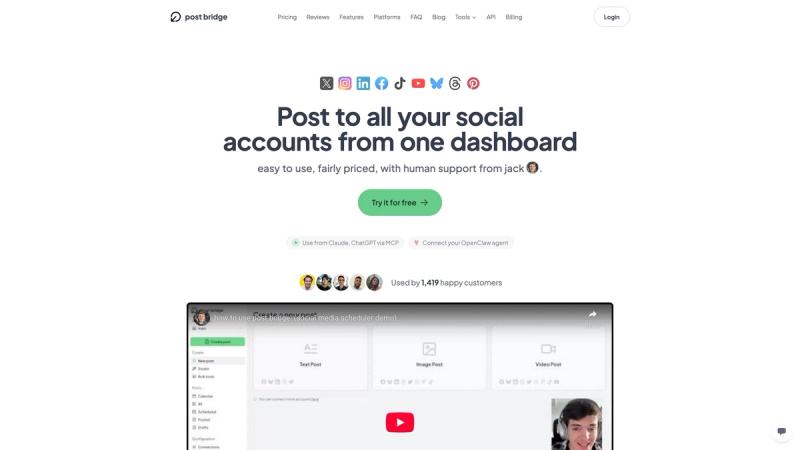
The actual Post Bridge platform - designed by indie hacker Jack Friks to solve his own cross-posting pain.
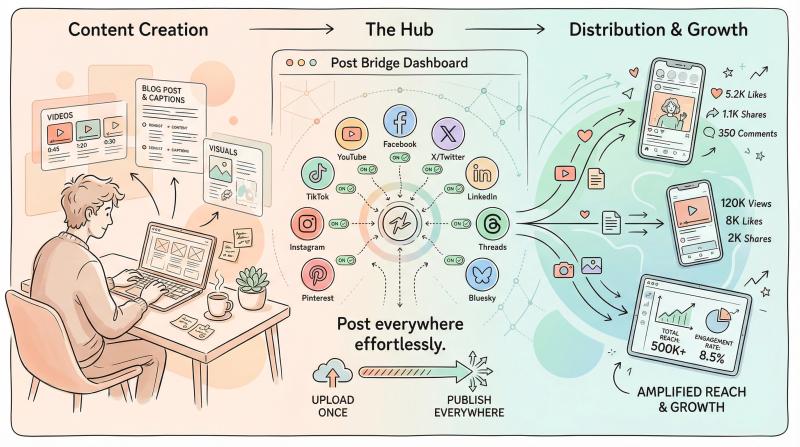
One Dashboard for 9 Major Networks
Post Bridge supports publishing to nine of the most important social platforms from one place:
When you upload content to Post Bridge, you simply select which platforms should receive the post. You can literally post to all of them at once with a single click.
Upload a video and have it go out to Instagram, TikTok, YouTube (as a Short), Facebook Page, LinkedIn profile, Threads, and X in one scheduling action.
This "upload once, publish everywhere" design means you never have to upload or copy-paste the same content multiple times.
Per-Platform Customization Without Starting Over
Post Bridge lets you customize captions and content for each platform easily before you schedule.
You write a base caption, then tweak it for X's shorter limit or add hashtags for TikTok. You can choose different aspect ratios or thumbnail images per platform when applicable.
Maybe you want a 16:9 thumbnail for YouTube but a 4:5 cropped image for Instagram. Post Bridge lets you do that without creating separate posts from scratch.
Your audience on each platform gets a version that feels tailored to them, yet you only used one tool and one workflow.
Visual Content Calendar & Scheduling
The app includes a visual content calendar where you can see all your upcoming (and past) scheduled posts across platforms.
This makes it easy to:
- Plan ahead and ensure consistent coverage
- Drag-and-drop to reschedule posts
- See at a glance which days look empty
- Color-code which platform each post targets
This centralized calendar keeps your cross-posting organized. No more guesswork like "did I remember to post that on LinkedIn?" you can check the calendar and know.
Post Bridge supports scheduling ahead up to 2 months in advance. Whether you want all versions to go out simultaneously or staggered, you have full control.
Automatic Format Compliance & Smart Processing
One hassle of manual cross-posting? Each platform's media requirements (file sizes, durations, dimensions).
Post Bridge helps by automatically processing your media to fit platform specs where possible. If you upload a large video, it can compress it to meet TikTok's 1GB file limit or trim videos to fit Reels length requirements.
It has built-in cropping and preview so you can see how your video or image will look on each platform before posting. You can make adjustments without leaving the tool.
Post Bridge also keeps up with platform API rules and limitations automatically. For instance, YouTube's API doesn't allow setting custom thumbnails for Shorts, so Post Bridge won't give that option. But it will for TikTok and Instagram, which do support custom thumbnails via API.
By handling these technicalities, the tool lets you focus on content instead of picky upload requirements.
Multi-Account & Compliance Built-In
If you're managing several brands or profiles, Post Bridge supports multiple accounts per platform.
You can connect three different Instagram accounts or five X accounts and easily choose which to post to each time.
Important safeguard: you can only post to one account per platform at a time, per post. This complies with platform rules against duplicate posting to multiple profiles (see Rule 1 above).
You can have one post go out on BrandA's Facebook + BrandA's Instagram, then separately schedule a similar post for BrandB's accounts. For teams, Post Bridge offers user roles so colleagues can collaborate.
Affordable and Creator-Focused
Unlike legacy social media tools that target big enterprises with big budgets, Post Bridge is designed (and priced) for independent creators, entrepreneurs, and small teams.
Plans start at just $9 per month for robust features (even less with annual billing). There's also a free tier for trying it out.
For comparison, enterprise-focused tools can run $99+/month for multi-platform support.
Post Bridge aims to be more budget-friendly while supporting more networks.
In essence, Post Bridge brings all the best practices we've discussed into one tool. You can plan your cross-posts, tailor them to each platform, and schedule with confidence, knowing your content will be automatically distributed across all your linked accounts.
No more logging into 9 apps every time you want to post.
Caption Templates for Each Platform
Use one "idea," swap the wrapper.
Master Caption Structure
Your source template for all platforms:
- Hook: 1 line that grabs attention
- Value: 1-3 lines explaining what this post delivers
- Proof/example: 1 line showing it works or matters
- Call to action: 1 line telling people what to do next
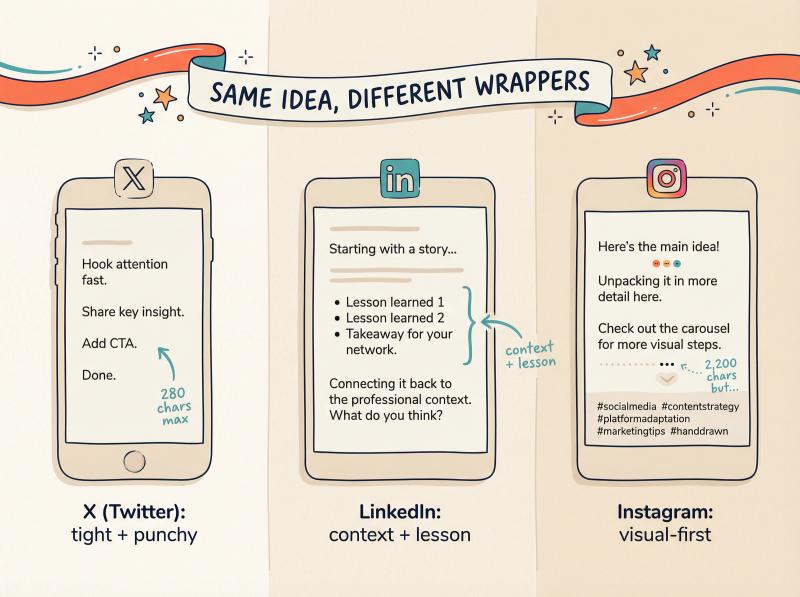
X (Twitter) Template
Tight + punchy
- Hook (hot take or bold statement)
- 1 key point
- 1 example
- "full breakdown:" + link (optional)
Remember: max 280 characters for free users.
LinkedIn Template
Context + lesson
- What happened (1-2 lines setting the scene)
- What I learned (bullets or short paragraphs)
- What to do next (1 line with actionable advice)
- Question to invite comments
Remember: LinkedIn readers expect depth and professional framing.
Instagram Template
Visual-first
- Hook that matches the visual
- Short story or key takeaway
- 3-8 hashtags (don't overdo it)
- Optional: "save this" style CTA
Remember: Instagram supports up to 2,200 characters but most people only read the first 2 lines before "see more."
Threads Template
Conversation starter
- 1 strong sentence
- 1 follow-up line (why it matters)
- Question to spark replies
Remember: keep link count low. Threads has API-level constraints on links (5 link maximum as of December 2025).
Bluesky Template
Ultra-concise
- One sentence
- One link (if needed)
Remember: Bluesky's 300-character limit is real and strict. No exceptions.
Pre-Publish Checklist for Cross Posting
Print this. Seriously.
Content
□ no watermark
□ hook hits in first 2 seconds (for video)
□ captions are platform-appropriate (not identical everywhere)
Platform Fields
□ YouTube: title and description set (don't rely on caption-only)
□ thumbnails: set where supported, understand Shorts limitations
Compliance
□ not posting identical content to multiple accounts on the same platform
Operations
□ schedule is human-paced (not a 20-post blast)
□ you can repeat this workflow weekly without hating your life
That last one is the real metric.

Common Cross Posting Problems (and Fast Fixes)
"My Post Failed on One Platform"
Usually: token/auth issue, permission problem, media constraints, or platform-specific requirements.
If using Post Bridge, check upload limits (file size/length) and platform-specific restrictions.
"It Posted, but Got Zero Views"
Common causes:
- Duplicate content patterns (especially same-platform multi-account posting)
- Spammy scheduling cadence (50 posts in 10 minutes)
- Watermark or unoriginal signals
Post Bridge explicitly warns that same-platform duplicate posting can lead to "zero views or engagement" and account restrictions.
"My YouTube Shorts Thumbnail Won't Set"
That's an API limitation, not you.
Post Bridge documents that you can't set custom thumbnails for YouTube Shorts via YouTube's API.
"I Can't Schedule Threads on X Like I Expected"
Scheduling threads is not the same as scheduling a single post.
Post Bridge documents thread scheduling limitations, including the cost realities of X's API.

What Makes Elite Cross Posting (Not Just Efficient)
Efficient means you save time. Elite means you build an asset that compounds.

1) you build an asset library (hooks, templates, thumbnails you can reuse)
2) you track winners (which hook style worked on which platform, which topics resonated where)
3) you repackage, not repost (same core idea, new angle or format)
4) you batch (1-2 creation days per week, automated distribution the rest of the time)
That's how you publish a lot without becoming spam.
Learn more about building a systematic approach in the Post Bridge growth guide.
Best Practices for Professional Cross Posting

Don't Treat Every Platform Exactly the Same
Yes, you're sharing the same core content, but speak the language of each platform when you post.
Adjust your tone, length, and formatting. A casual meme-style caption that works on Instagram might need a professional rewrite on LinkedIn.
Be Selective (Not Everything Goes Everywhere)
It's often better to skip a platform than force an ill-fitting post there. If content only makes sense on two of your four channels, skip the others.
Quality and relevance matter more than volume.
Space Out Your Posts
Avoid blasting the identical post to all platforms simultaneously. Different networks have different peak times, and if someone follows you everywhere, seeing the same message repeatedly can feel robotic.
By spacing posts out, you also give yourself bandwidth to engage on each platform when content goes live.
Respect Platform Rules
A big one: don't post the same content to multiple accounts on the same platform simultaneously. this is viewed as spam by most networks and can get accounts flagged.
Also avoid repeatedly posting just to push links. Provide value, not just "go to my site!" everywhere.
Engage with Each Community
Cross-posting isn't "set and forget." when your post goes live on each platform, spend a little time there to respond to comments, answer questions, or thank people for engaging.
This shows there's a real person behind the posts and builds rapport. It can also help the algorithms (early engagement often boosts reach).
Keep Branding Consistent (but Adapt Format)
Use cross-posting to reinforce your branding across channels. Use the same or similar profile picture, cover image, bio, and overall voice so people recognize you.
Consistency strengthens your identity and makes your brand feel cohesive.
That said, format can change. Maybe on Instagram you use more emojis and a friendly tone, while on LinkedIn you're more straightforward. Both can still feel on-brand.
Track and Adjust
Use analytics to guide you. Set a reminder monthly or quarterly to review your cross-posting results.
Which platforms grew? Which lagged? Did cross-posting save you time and boost engagement?
Always prioritize your own data over general advice.
Explore social media best practices to refine your strategy further.
Frequently Asked Questions

Is It Okay to Post the Exact Same Content Across Different Platforms?
Yes. Repurposing the same core content on multiple platforms is not only okay, it's smart, as long as you adapt it appropriately.
There's no rule against sharing the same video or image on Instagram, Facebook, X, etc. Many successful brands do this regularly.
The key is making small tweaks so the post fits each platform's format and audience (adjust caption length/tone, crop images if needed, use platform-specific features).
When done right, cross-posting will not hurt your reach or engagement. Social algorithms don't penalize you just for posting similar content on multiple platforms.
The only time you might see a penalty is if you're posting watermarked videos from other platforms (Instagram might down-rank TikTok watermarks) or if you violate community guidelines.
But generally, sharing the same content in multiple places is a recommended strategy for wider exposure.
Will I Get Penalized or Banned for Cross-Posting to Many Accounts?
Posting the same content to multiple platforms (Twitter + Facebook + Instagram) is absolutely fine. Social networks expect that.
Where you can run into trouble is posting the same content to *multiple accounts on the same platform simultaneously*.
For example, if you manage five X accounts and tweet the exact same message from all five at once, or you run several Instagram pages and cross-post the identical photo/caption to all of them at the same time, that is considered duplicate/spammy behavior.
Most platforms have policies against mass-posting duplicate content on the same network.
Post Bridge and similar tools intentionally restrict this (you can only select one account per platform when you post) to keep you compliant.
Summary: cross-posting to different platforms = okay. Spamming many accounts on one platform = not okay.
What's the Best App or Tool for Cross-Posting?
There are several good tools, and "best" depends on your specific needs.
For solo creators or small businesses on a budget, we recommend Post Bridge. It's built to be cost-effective (plans start at $9/month) and supports 9 platforms, which is more than most tools.
Post Bridge lets you customize each post easily and has a simple, clean interface without enterprise bloat.
If you need advanced analytics or complex team workflows, enterprise-focused tools exist, but they often charge $99+ per month for features aimed at large teams.
Summary: evaluate what platforms you need, what your budget is, and what features matter. If you're looking for a balanced solution that covers all major platforms without breaking the bank, Post Bridge is a strong choice.
Sign up or learn more about pricing.
Do I Need to Be on Every Social Platform?
Not necessarily. It's usually better to focus on the platforms where your target audience is active, rather than spreading yourself too thin.
Cross-posting makes it easier to maintain a presence on multiple sites, but there's still effort involved in engaging on each.
If a platform doesn't align with your brand or isn't popular with your audience, you can skip it. For instance, if you're B2B focused, TikTok might not be a priority. If you're a visual artist, LinkedIn might not yield much.
That said, it can be good to at least reserve your handle on new platforms and maybe post occasionally, just in case one blows up in popularity.
Use cross-posting to efficiently cover the platforms you care about. You might start with 2-3 core platforms and add others if you see opportunity.
Always weigh the benefit (potential reach, new audience) against effort required.
Quality over quantity. it's better to do a great job on a few platforms than a mediocre job on all of them.
Check out the growth guide for platform selection strategies.
How Do I Avoid Looking Spammy When Cross-Posting?
Follow the 7 rules outlined above:
- Don't post to multiple accounts on the same platform
- Upload fresh content, don't just share links
- Remove watermarks
- Customize captions per platform
- Schedule like a human
- Respect platform limitations
- Track what works and adjust
Also, engage genuinely on each platform. Respond to comments, participate in conversations, provide value beyond just broadcasting your content.
What If I Don't Have Time for Customization?
Even small tweaks make a big difference. You don't need to rewrite from scratch.
Change the first line, adjust hashtags, tweak the call-to-action. That's often enough to make content feel native to each platform.
Tools like Post Bridge streamline this by letting you edit captions per platform within the same workflow. It takes 2-3 extra minutes but dramatically improves results.
If you truly don't have time, focus on fewer platforms and do them well rather than spreading thin across all nine with identical posts.
Explore the free tools to help streamline content faster.
Start Cross Posting Smarter Today
Cross-posting is one of the most powerful tactics for anyone managing multiple social channels. When you approach it thoughtfully, it unlocks extra value from every piece of content you create.
You can reach more people without spending extra hours, stay consistent everywhere your audience hangs out, and ensure no great content goes unnoticed on a dormant account.
It's about working smarter, not harder.
Here's the recap:
Plan first. know which platforms matter for your audience and content. Cross-posting works best as part of a strategy, not as a random afterthought.
Tailor content. adjust each post to fit the platform. Your message stays the same, but how you deliver it changes to resonate with each audience.
Use tools to your advantage. a good scheduling tool like Post Bridge can automate the busywork and help you stay organized. This is a game-changer for maintaining quality at scale.
Analyze and refine. pay attention to performance on each platform and continuously improve your approach. Over time, you'll hone in on exactly what content to post where and when for the best results.
In 2026 and beyond, the social media landscape will only get more diverse. Having a solid cross-posting system means you can quickly adapt and maintain a presence anywhere without stretching yourself too thin.
It future-proofs your social strategy.
So if you've been struggling to keep up with posting everywhere, give cross-posting a try using the steps and tips in this guide. Done right, it can dramatically boost your efficiency and your audience growth.
And if you want to make cross-posting super effortless, consider using Post Bridge to handle the heavy lifting of scheduling and publishing to all platforms in one go. It's designed to help creators like you "post everywhere effortlessly" while leaving you more time to engage and create.
Remember: the goal isn't to spam every platform with identical content. It's to share your message widely in a thoughtful way.
Cross-posting is a means to amplify your voice across the social web.
With the knowledge you now have, you can cross-post with confidence and watch your multi-platform presence thrive.
Check out more resources:
- How to grow your social reach
- Instagram post vs story vs reel
- What social media platform pays the most
Happy cross-posting, and see you everywhere. 🚀