
Why Your LinkedIn Impressions Dropped 50-65%
Before we diagnose your specific situation, you need to understand the bigger picture. Many LinkedIn users saw their impressions drop 50-65% in the past year. Frustrating when your content feels invisible, but here's the critical insight: it's not just you.
LinkedIn dramatically overhauled its feed algorithm. The company rolled out what insiders call the 360Brew AI engine in Q4 2025. It fundamentally changed how posts get distributed.
What Changed with LinkedIn's 360Brew Algorithm
The old LinkedIn algorithm was relatively simple. Post something → get initial engagement → if people interacted quickly → your post spread further. You could game the system with engagement pods, clickbait hooks, or timing tricks.
The new algorithm doesn't work that way anymore.
360Brew actually reads your posts. Analyzes your profile. Decides who should see them. It's looking for genuine relevance and quality, not just quick likes. According to LinkedIn's own engineering team, the platform now optimizes for "meaningful conversation" and attention time, not vanity metrics.
The feed also got more crowded. Between native content, ads, and sponsored posts, organic reach is down roughly 47% on average compared to a year ago.
| Metric | Old Algorithm | New Algorithm (360Brew) |
|---|---|---|
| Primary signal | Quick engagement (likes, shares) | Dwell time + conversation quality |
| Gaming potential | High (pods, clickbait worked) | Low (AI detects manipulation) |
| Organic reach trend | Stable | Down 47% average |
| Distribution logic | Viral momentum | Relevance matching |
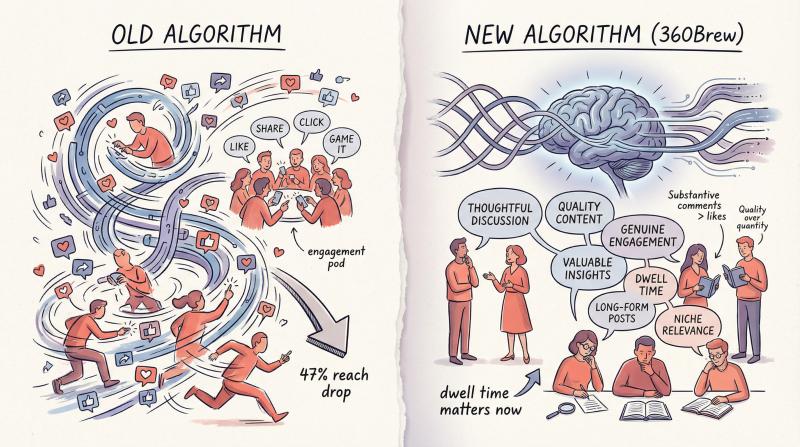
Key insight: If your impressions are down, don't panic. The algorithm shifted for everyone. Doesn't mean you're doing something wrong. Means you need to adapt to a quality-driven system.
What Is a LinkedIn Impression (And Why 0 Is Different)
Let's get technical for a moment because this matters.
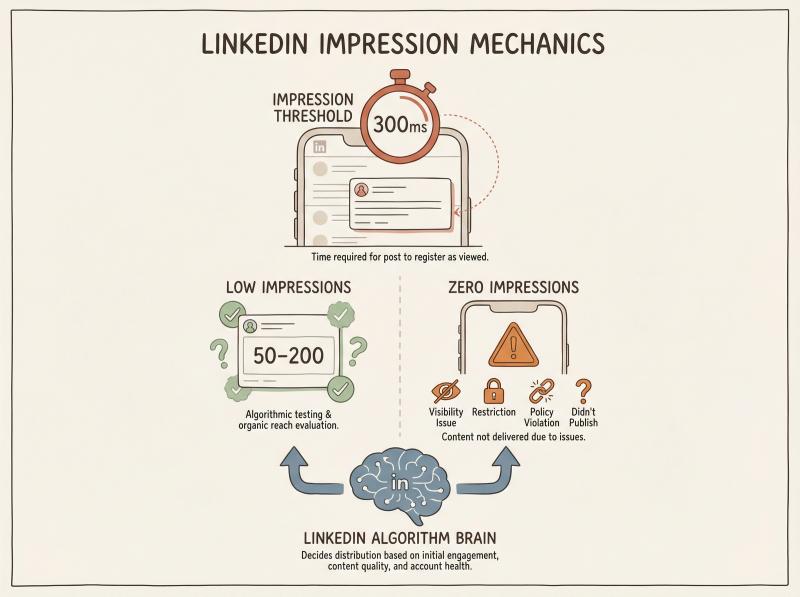
An impression on LinkedIn means your content appeared on someone's feed for at least 300 milliseconds (about one-third of a second). That's it. One impression = your post showed up on one person's screen, whether they engaged with it or not.
Some important distinctions:
Impressions vs. Reach
- Impressions = total times your post was displayed (including repeat views)
- Reach (or "members reached") = unique people who saw it at least once
Low impressions (like 50-200 when you normally get 1,000+) usually means your post is failing LinkedIn's quality or relevance tests. You're not being shown because the algorithm doesn't think your content will resonate.
Zero impressions is different entirely.
It usually indicates one of these specific problems:
- Visibility setting is too narrow (connections only, or posted to a group)
- Content was restricted or removed for policy violations
- Account has some kind of restriction active
- Post didn't actually publish correctly (rare, but it happens)
We'll dig into all of these scenarios below, but first you need to understand how LinkedIn decides who sees your posts in the first place.
How LinkedIn Decides Who Sees Your Posts
LinkedIn doesn't reward you for posting. It distributes your post when it predicts a specific viewer will find it relevant and worth their attention.
Think of it as three gates your post must pass through:
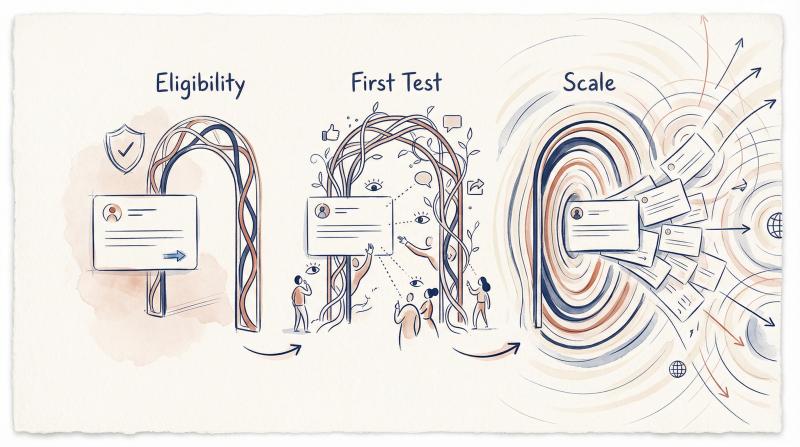
① Gate 1: Eligibility
Can this post be shown at all?
LinkedIn checks basic requirements:
- Is the content policy-compliant?
- Is the account in good standing?
- What's the visibility setting (anyone vs. connections only)?
- Are there any active restrictions?
If your post fails here, it goes nowhere.
② Gate 2: First Test
Does a small slice of your audience react and stay with it?
LinkedIn shows your post to a sample of your network (plus a few people outside it, based on relevance signals). The algorithm watches:
- Do people scroll past quickly, or do they stop?
- Are they clicking to read more?
- Are they commenting with substance (not just emojis)?
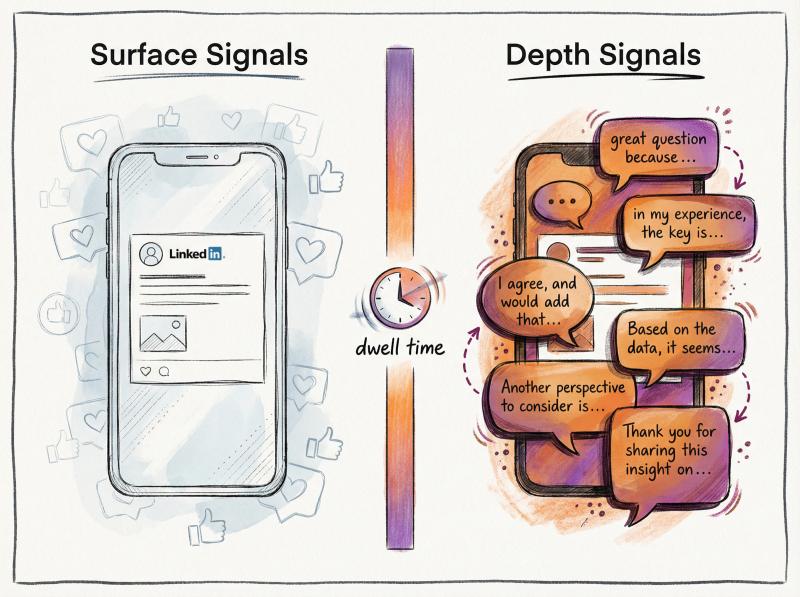
This is where dwell time becomes critical. LinkedIn's engineering blog explicitly describes using dwell time behavior to improve feed ranking, including predicting short dwell time and treating it as a negative signal.
Translation: if people scroll past your post in half a second, you don't advance.
③ Gate 3: Scale
Does your post keep earning attention and conversation over time?
If you pass the first test, LinkedIn keeps showing your post to more people. But it's not automatic. The algorithm continuously evaluates:
- Are new people engaging?
- Is the conversation meaningful (not just “great post!” replies)?
- Are people saving or sharing it?
Posts that sustain engagement over hours or even days can reach thousands more people. Posts that stall get buried.
Important shift: who sees your post now depends heavily on your profile's topic alignment. If your LinkedIn profile says you're a “Marketing Director” but you post about crypto or personal travel, the algorithm gets confused about your expertise and may show your content to almost no one.
The system tries to match content with audiences by interest, not just by who you're connected to. A scattered content strategy will tank your impressions.
2-Minute Triage (Check These First)
Before you overhaul your entire content strategy, run through this quick diagnostic. These issues cause “mysterious” low impressions more often than you'd think.
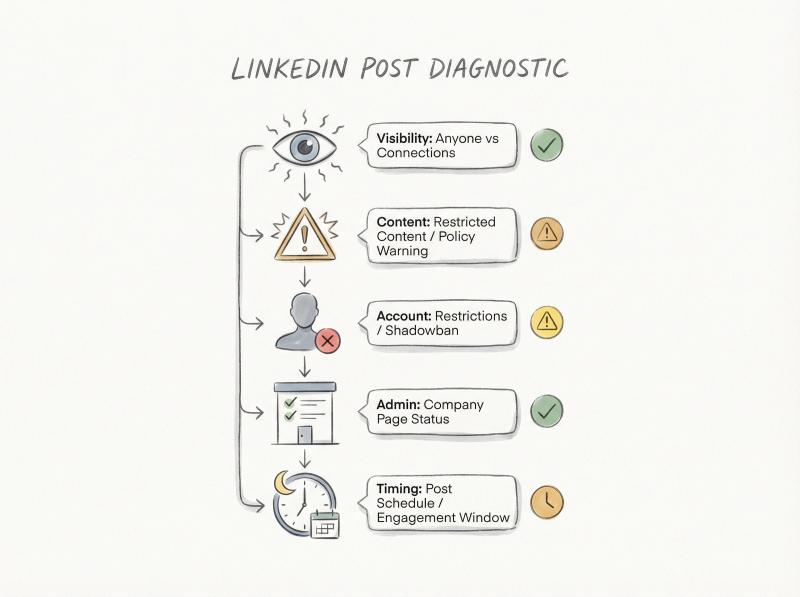
① Check Your Visibility Setting
LinkedIn lets you post to:
- Anyone (public + can reach extended network)
- Connections only (just your 1st-degree connections)
- Group (only group members see it)
Here's the catch: you can't change visibility after posting. And for scheduled posts, visibility is locked to whatever setting you chose when you created the schedule.
What to do:
Confirm you're posting to “anyone” if your goal is reach beyond your immediate network. If you accidentally posted to “connections only” or a group, that explains the low numbers. LinkedIn's help documentation clarifies where "anyone" posts can appear (connections' homepages, 2nd/3rd degree if engaged/reshared, search results, etc.).
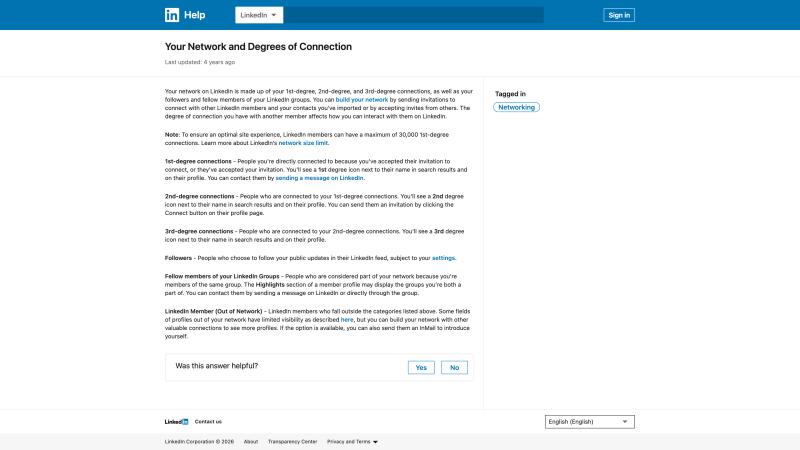
This screenshot shows LinkedIn's official help documentation about visibility settings. Understanding these options is critical when diagnosing low impressions.
② Look for Content Removal or Restriction
LinkedIn can remove content or restrict who sees it if it violates professional community policies. If they uphold a removal decision, only you can access the post. That looks like “my post is live but has no reach.”
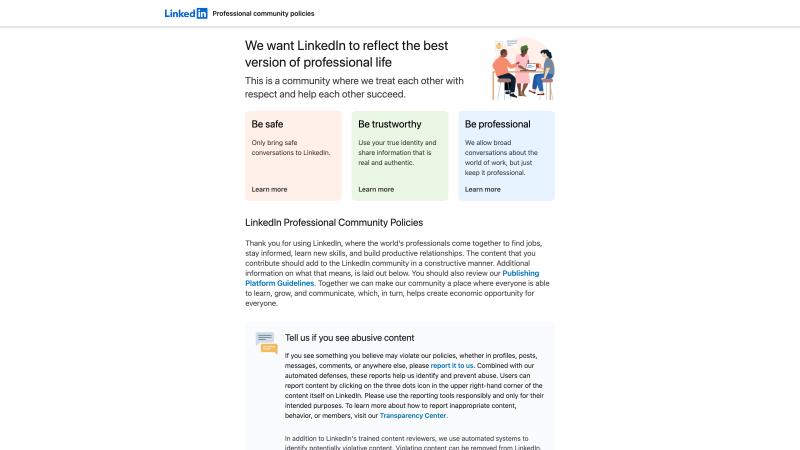
Review these official LinkedIn community policies to understand what content might get restricted or removed. Staying within these guidelines helps avoid impression problems.
What to do:
- Check in-app notifications for policy actions
- If you believe it's a mistake, request a second review through LinkedIn's appeals process
- Stop reposting the same borderline content (repeat violations increase restriction risk)
③ Check If Your Account Is Restricted
LinkedIn explicitly states that accounts can be restricted for policy violations, identity issues, or automated tool violations. They also prohibit third-party software/extensions that scrape, modify appearance, or automate activity on LinkedIn's website.
What to do:
- If you've used browser automation, scraping tools, auto-view tools, auto-DM tools, or connection request bots: stop immediately
- Check if LinkedIn is asking you to verify identity or review activity
- Return to normal human behavior (real comments, real connections, normal posting cadence)
④ Company Page Specific Issues
If you're posting from a company page (not a personal profile), LinkedIn's page troubleshooting notes several gotchas:
- You must have the right admin permissions
- Posts should have 40 or fewer mentions (tagging too many people breaks it)
- Link preview issues can be caused by the landing page's SSL certificate
- Hashtags should be appropriate and not violate guidelines
Important note: Company pages typically get far lower organic impressions unless you already have a huge follower base or employees actively share the posts. LinkedIn's feed algorithm favors content from individuals (people engage more with people than with brands).
⑤ Don't Panic About "Old Posts Resurfacing"
In mid-June 2025, LinkedIn rolled out a tweak to balance recency with relevance. Users started seeing posts that were two or three weeks old at the top of their feed. LinkedIn confirmed in public statements that this was intentional, not a bug.
Translation: even if your post starts slow, it's not necessarily dead. But only if it's eligible and it earns attention when it finally hits the right viewers.
15 Reasons Why LinkedIn Posts Get No Impressions
Now let's get into the real diagnosis. Below are the specific causes that kill LinkedIn reach, with symptoms, explanations, and fixes that actually work. Use this like a troubleshooting menu: match your symptom, understand the cause, apply the fix.
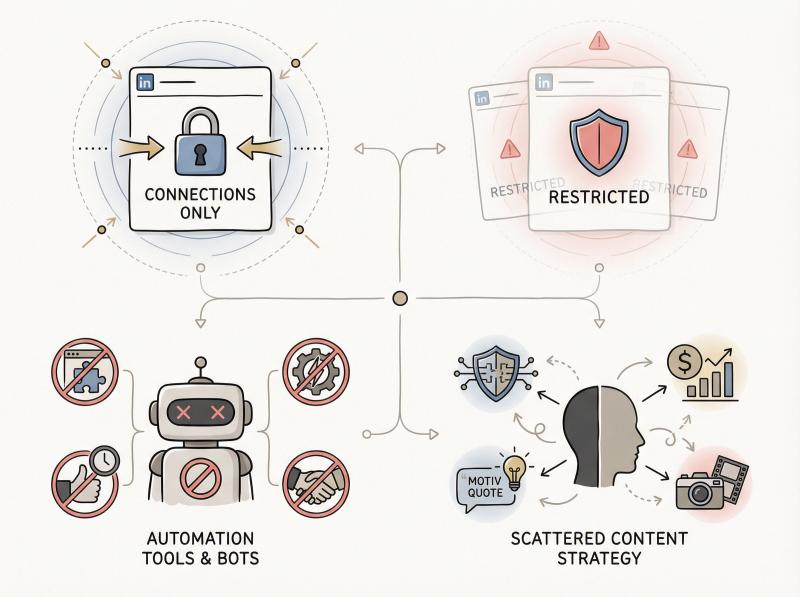
Why Your Post Has Low Reach: Wrong Visibility Setting
Symptom: Impressions way lower than usual. Mostly getting views from 1st-degree connections. No discovery from people outside your network.
Why it happens:
Connections-only posts can't spread widely. They're limited to people directly connected to you. Group posts are constrained to the group. When you select “anyone,” your post can appear on connections' homepages, reach 2nd/3rd degree connections if reshared or engaged, show up in search results, and surface to relevant users beyond your network.
Fix:
- Post to anyone when your goal is reach
- If you need “connections only” for privacy reasons, accept the tradeoff (that's not a bug, it's how the setting works)
- Check your visibility setting before you schedule posts (you can't change it after)
Why LinkedIn Restricted Your Post Visibility
Symptom: Post exists on your profile, but impressions are near-zero. You might see a warning notification in-app.
Why it happens:
LinkedIn can restrict visibility or remove content that violates policies. If removal stands after review, only you can access the post. To everyone else, it's invisible.
Fix:
- Review the post against LinkedIn's professional community policies
- Request a second review if you believe it was removed in error
- Stop reposting the same borderline content (repeated violations increase restriction risk)
How Automation Tools Kill LinkedIn Impressions
Symptom: Impressions collapse across multiple posts, not just one. Other weird platform behavior starts happening (limits on actions, unusual prompts, reduced ability to interact).
Critical warning: LinkedIn states that automated inauthentic activity and prohibited automation tools can result in restriction. This includes scraping tools, auto-engagement bots, auto-connection tools, and browser extensions that modify how LinkedIn works.
Fix:
① Remove browser extensions or automation tools that scrape or automate LinkedIn activity
② If LinkedIn prompts identity verification, complete it
③ Return to normal human behavior: real comments, real connections, normal posting cadence
④ Give it time (restrictions often lift after you demonstrate genuine activity)
Profile-Content Mismatch: The New Impression Killer
Symptom: your posts get little to no reach despite having a decent-sized network. your content quality seems fine, but it's just not being shown.
Why it happens:
This is one of the most impactful changes with the 360Brew algorithm. LinkedIn's AI now reads your profile AND your posts to determine topic expertise and audience fit. If there's a mismatch, your content goes nowhere.
Example: if your profile says you're a cybersecurity expert, but you post about personal finance one day, motivational quotes the next, and then finally cybersecurity, the algorithm doesn't know who would find your content relevant. So it shows it to almost no one.
The algorithm tries to match content with audiences by interest. Scattered content strategy confuses the system.
Fix:
Optimize your profile for a clear niche. Make sure your headline, about section, and experience reflect the topics you want to be known for.
Post mostly about those core topics. This profile-to-content alignment gives the algorithm confidence about who might find your posts relevant.
If you're a cybersecurity expert, highlight that in your profile and consistently share cybersecurity insights (instead of random unrelated content).
Consistency builds authority and signals the algorithm to distribute your posts to the right people.
Think of it this way: the algorithm is trying to help you by connecting your content with interested audiences. But it needs clear signals about what you're an expert in.
Why Your LinkedIn Post Has Low Dwell Time
Symptom: impressions stall early, even if you have a decent network. you get a few polite likes but no sustained reach.
Why it happens:
LinkedIn explicitly uses dwell time signals in feed ranking and treats predicted short dwell time as a negative signal. Translation: if people scroll past your post in half a second, you don't scale.
Quality over quantity insight:
Longer posts (1,200-3,000 characters) that thoroughly explore a topic perform 31% better on average than short updates. Don't be afraid to write detailed posts. Interested readers will stick around, and the algorithm rewards that dwell time.
Format for readability:
Break up walls of text. Posts with 14+ short paragraphs (one or two sentences each) significantly outperform those with big blocks of text. Use line breaks, bullet points, or formatting for a scannable look. Post Bridge's LinkedIn text formatter tool can help you structure posts for better scannability.
Fix:
Rewrite the first 2 lines so people have to click “see more” or pause to understand. Structure for scanning:
① 1-line hook that creates curiosity
② 1-line context that establishes relevance
③ 3-5 bullets or short paragraphs with specific points
④ a sharp takeaway or lesson
⑤ a real question that invites thoughtful response
Fast experiment:
Post two versions of the same idea a week apart:
- Version A: long intro paragraph, generic formatting
- Version B: hook + bullets + clear takeaway + question
Keep everything else the same. If version B reliably lifts impressions, you found the problem.
Getting Likes But Not Comments on LinkedIn
Symptom: you get polite reactions (likes, maybe a few "great post!" comments), but reach never expands beyond your immediate network.
Why it happens:
LinkedIn's own guidance emphasizes content that sparks discussion and meaningful conversation. The platform explicitly focuses on outcomes and opportunity over vanity metrics.
New algorithm priorities:
The 360Brew algorithm puts much less weight on simple likes and far more on deeper engagement: comments, shares, and saves. A post with a few thoughtful comments can now beat a post with dozens of surface-level likes.
Important: LinkedIn actually favors comments that go beyond a quick phrase. aim for comments longer than 15 words with substance.
Fix:
Ask harder questions (not "thoughts?"). use prompts that invite expertise:
- "what would you do differently in this situation?"
- "what's the tradeoff people ignore here?"
- "if you had to bet $10k on one approach, which one and why?"
Reply fast and thoughtfully to early comments to keep the thread alive (this is how you earn more distribution).
Respond to every comment you get, ideally with more than just "thanks." extend the conversation.
Encourage saves/shares if appropriate. If you're posting something like a tip list or resource, add “save this post to come back later” or “share this with someone who needs to see it.”
Be patient:
Posts have a longer lifespan now. In the past, if a post didn't explode in the first hour, it was dead. Now a good post can gain traction over several days or even weeks as comments trickle in. Keep engaging in the comments. Don't delete a post just because it started slow.
Do Links in LinkedIn Posts Hurt Impressions?
Symptom: posts with links get noticeably fewer impressions than posts without them.
The old wisdom:
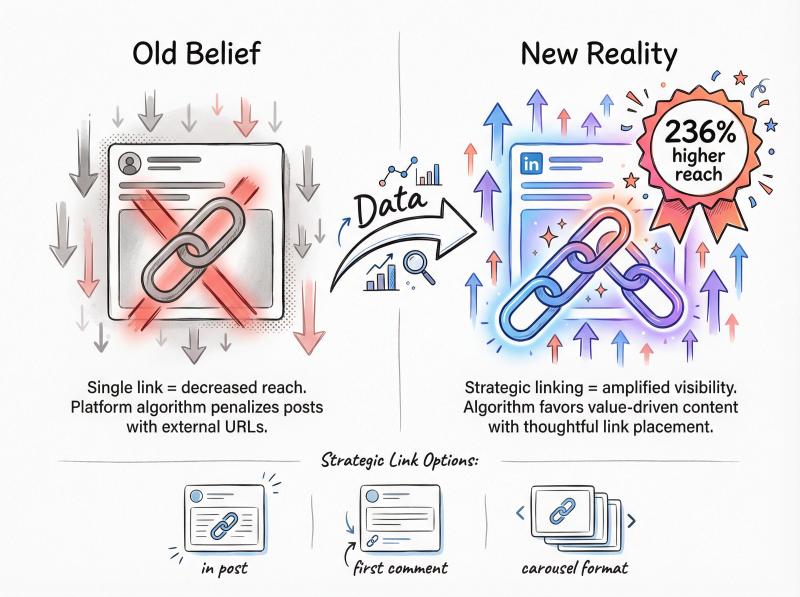
No platform loves sending users off-platform. The traditional recommendation has been to repurpose content into carousels/videos and push the link to comments.
But here's what changed:
Posts that provide valuable resources with multiple relevant links can perform extremely well. Analysis of hundreds of thousands of posts found that posts with 3+ helpful links got 236% higher reach on average. The key is that the links must be truly useful and on-topic.
If people click your link and find it valuable, that positive interaction can outweigh the old negative of “linking out.”
| Approach | When to Use | Expected Impact |
|---|---|---|
| Link in post body | Educational content, resource sharing, research-backed posts | Can boost reach if links add genuine value |
| Link in first comment | Promotional content, traditional safe approach | Neutral to slightly positive |
| Carousel instead | Visual tutorials, step-by-step guides | High engagement for B2B |
| No link at all | Engagement-focused posts, questions, discussions | Maximizes on-platform engagement |
Fix (choose your approach):
Option A: don't be afraid to share links
Use links to support your content (research, articles, tools, etc.), especially if your post is educational. Do not just drop a promo link with no context (that will still flop). Make the content great, use links to add value.
Option B: link in first comment
Deliver the value in the post, then add the link in your first comment (the traditional safe approach).
Option C: turn it into a carousel
Convert the link content into a document carousel or multi-image summary (works best for B2B).
Don't be superstitious. Test it:
Run 3 posts with the same offer:
- Post 1: link in the post body
- Post 2: link in first comment
- Post 3: no link, just "comment 'send' and I'll message it to you"
Track impressions + qualified replies. Keep whichever produces business outcomes, not just impressions.
Do Hashtags Still Work on LinkedIn in 2026?
Symptom: you're adding 5, 10, or even 20 hashtags hoping to get more eyes, but it's not working.
Why it happens:
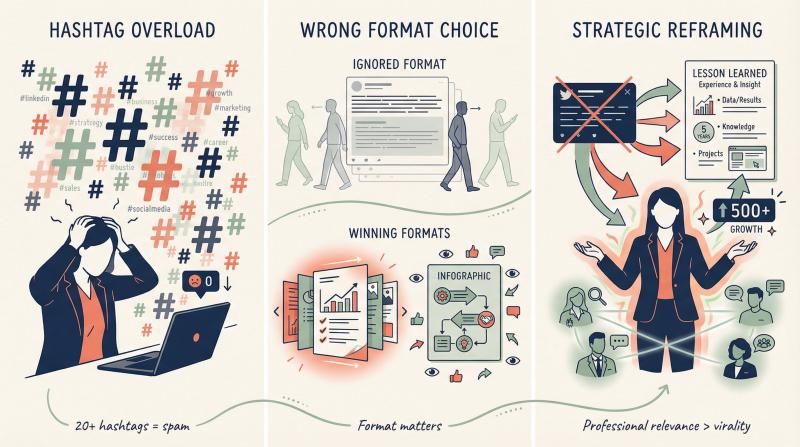
For years, people treated hashtags as the key to LinkedIn visibility. Unfortunately, hashtags just aren't a major factor in reach anymore. Overloading your post with hashtags can look spammy and doesn't guarantee distribution. LinkedIn's AI now understands content context without needing a dozen tags.
Fix:
- Use hashtags sparingly and strategically
- Stick to at most 3 relevant hashtags (industry or topic-specific tags that real people follow)
- Branded hashtags or witty tags are fine for style, but don't expect them to boost impressions
- Focus more on your actual content and keywords within the post. The algorithm parses your text for topic signals.
- Bottom line: hashtags won't make or break your post, so spend that energy on writing better content and engaging with commenters.
Wrong Format Killing Your LinkedIn Impressions
Your goal determines the best format. Not all content types perform the same way.
Format breakdown:
Document posts (PDF carousels)
You can attach a PDF so users can swipe through multiple pages. These often perform excellently for sharing guides, lists, or infographics and are currently one of the best formats for reach.
Images/Infographics
A striking image or infographic can grab attention and convey information quickly. Infographics in particular can both educate and encourage shares.
Native video
Video doesn't automatically guarantee virality, but a short, engaging video clip uploaded directly to LinkedIn can still stand out in the text-heavy feed. Especially if it tells a story or demonstrates something useful. Just ensure you add captions, since many users scroll with sound off.
Polls
Use sparingly. Polls were trendy in 2021-22 and LinkedIn has since dialed back their reach (due to overuse). A genuinely interesting poll can still get engagement, but don't rely on gimmicky polls for impressions. LinkedIn's AI can sniff out engagement bait.
Fix:
Pick formats intentionally:
- Awareness: polls + short video + multi-image
- Authority: native document carousel + long-form post
- Leads: value post with soft call-to-action in comments/DM
Why Twitter-Style Posts Fail on LinkedIn
Symptom: your content feels punchy and clever, but it flops on LinkedIn.
Platform reality check: LinkedIn rewards professional relevance and “knowledge + advice.” The platform is for professional knowledge and advice, not virality-for-virality's sake.
Fix:
Keep the idea, change the framing:
- From “hot take” → “lesson learned from experience”
- From “dunk on someone” → “tradeoff most people ignore”
- From “thread” → “framework + real-world example”
- Add one real-world proof point (numbers, screenshot, specific process you used)
LinkedIn users want insights they can apply to their work, not just entertainment. Adjust your tone accordingly. For more on professional social media best practices, check our comprehensive guide.
Why Your LinkedIn Network Hurts Your Reach
Symptom: your posts get impressions, but from the wrong audience. or your reach is consistently low despite decent content.
Why it happens:
LinkedIn ranking prioritizes relevance and connection context (who you are to the viewer, what you post about, what they engage with).
Fix:
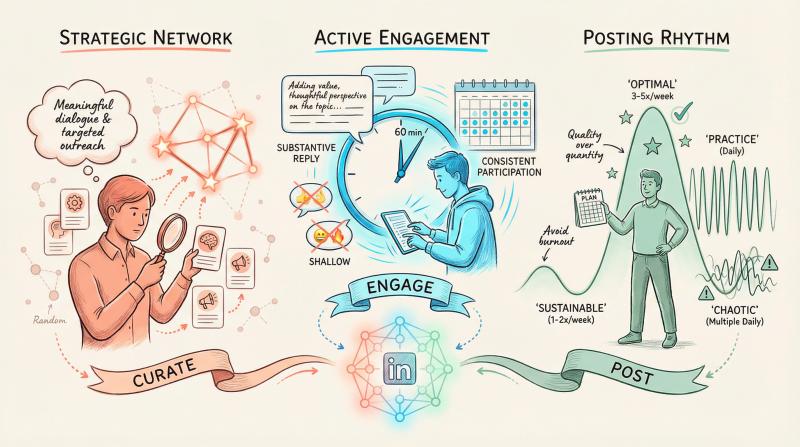
Stop collecting random connections. quality matters more than quantity.
Spend 2 weeks connecting only with people who match your target audience. comment on their posts first so you're not a stranger when you send the request.
Clean up your profile headline/about so LinkedIn (and humans) know what you're about.
Grow your network strategically:
- Connect with people in your industry or target audience
- Be active in comments on others' posts. Insightful comments can get you noticed and lead to new connections while also warming up the algorithm that you're an engaged member of the community
- Follow and interact with industry hashtags or LinkedIn topics to get your name appearing in those circles
The goal is to build a network of people who will genuinely care about your content. The algorithm will follow.
Why Inactive LinkedIn Users Get No Impressions
Symptom: scheduled posts go out, but they don't get traction.
Why it happens:
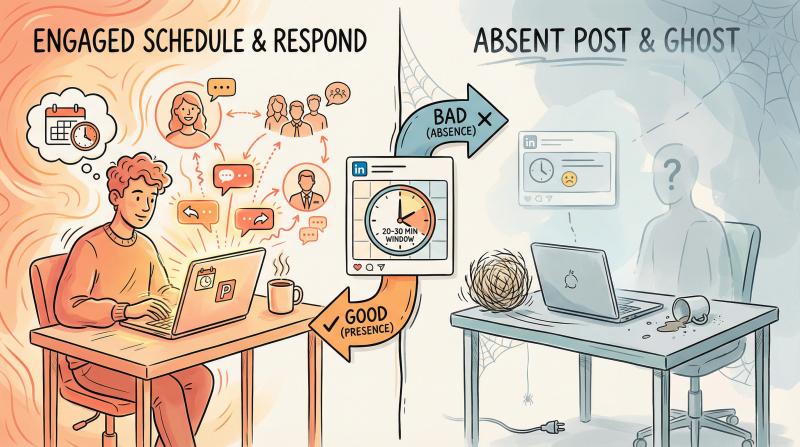
Distribution depends heavily on early signals. If you're not around to reply and create conversation within the first 30-60 minutes, you often fail the “first test gate.”
Fix:
Be online for 20-30 minutes after posting. set a reminder if you schedule posts.
Reply to every early comment with substance (not emojis or “thanks”). Ask follow-up questions. Add value. Keep the conversation going.
Engage beyond your posts: LinkedIn favors users who contribute to the community, not just talk about themselves. Spend time engaging with other people's content daily. Comment thoughtfully on industry-relevant posts, celebrate others' achievements, answer questions in your feed.
Important scheduling note:
LinkedIn confirms that scheduled posts publish with the visibility setting chosen at creation. So scheduling itself isn't the villain. Missing the early engagement window usually is.
How Often Should You Post on LinkedIn?
Symptom: you rarely post, or you spam-post low-quality content every single day.
Why it happens:
If you rarely post, LinkedIn's algorithm and your followers might “forget” about you. If you spam-post, people may start ignoring you (and the algorithm will follow suit). LinkedIn does seem to reward a regular cadence of posting, as long as quality stays up.
| Posting Frequency | Impact | Best For |
|---|---|---|
| 1-2 times/week | Sustainable, quality-focused | Established experts with engaged following |
| 3-5 times/week | Optimal for most | Active professionals building presence |
| Daily (weekdays) | High practice value | New creators learning and iterating |
| Multiple times/day | Risky (spam signals) | Avoid unless curating diverse content types |
Fix:
- Set a sustainable schedule for content. For many, 3-5 posts per week is a good target. active enough to stay on the radar, but not so much that you can't maintain quality.
- If you're newer or growing your network, posting daily (weekdays) can help you practice and get feedback, but ensure each post has something of value. Don't post just to hit a quota.
- On the other hand, established experts might do better posting a bit less frequently but with meatier insights.
- Find the balance that lets you show up consistently and thoughtfully.
A tool like Post Bridge's LinkedIn scheduler can help you maintain consistency without the stress of manual posting.
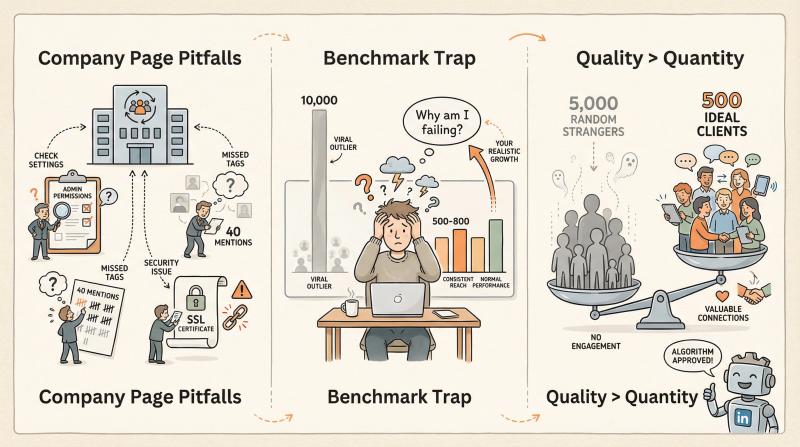
Company Page Posts Getting No Impressions
Symptom: company page posts are inconsistent, fail to publish correctly, or behave weirdly.
Why it happens:
LinkedIn page troubleshooting includes common failure points like permissions, incorrect media specs, and the "40 or fewer mentions" rule.
Fix:
- Verify you have the correct admin role for the page
- Keep mentions under 40 (tagging too many people breaks posts)
- Validate link preview/SSL if using a URL (check the landing page's certificate)
- Use appropriate hashtags that don't violate guidelines
Comparing to the Wrong LinkedIn Benchmark
Sometimes the post is fine. You're just benchmarking against a viral outlier or outdated numbers.
Fix:
Track your rolling median:
- Median impressions for last 10 posts
- Median engagement rate by impressions
- Best-performing format for your specific audience
Then judge wins/losses against that. Don't compare yourself to someone else's viral post or your own outlier from 6 months ago.
Remember: Thousands of impressions don't matter if they aren't the people you care about. It's better to have 500 impressions from your ideal clients or community than 5,000 from random strangers who will never engage. LinkedIn's algorithm now works to make sure the right people see your posts, not just the most people.
How to Diagnose Low LinkedIn Impressions (7 Steps)
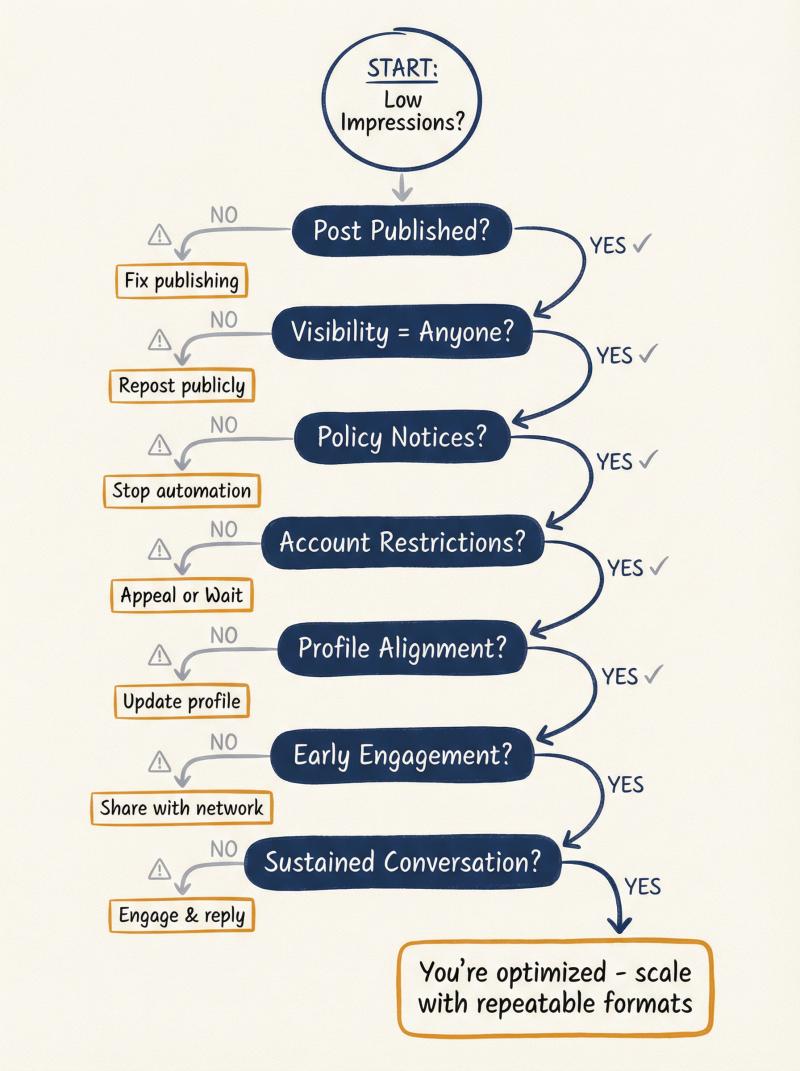
Use this decision tree to pinpoint your specific issue:
| step | question | action if no | action if yes |
|---|---|---|---|
| 1 | did the post publish? | fix publishing issue (permissions, media specs) | go to step 2 |
| 2 | is visibility set to "anyone"? | accept lower reach or repost publicly | go to step 3 |
| 3 | any policy notice or removed content notice? | go to step 4 | request review if appropriate |
| 4 | any account restriction or automation flags? | go to step 5 | stop automation, resolve restriction, return to human behavior |
| 5 | does your profile align with content topics? | update profile for clear niche, focus content on core topics | go to step 6 |
| 6 | does post earn early attention? (people stop + comment) | improve hook, structure, relevance; run A/B experiment | go to step 7 |
| 7 | does post sustain conversation over hours/days? | upgrade question, reply better, add real examples | you're fine; scale with repeatable formats |
How to Fix Low LinkedIn Impressions (7-Day Plan)
If your impressions have tanked, here's a practical week-by-week reset plan:
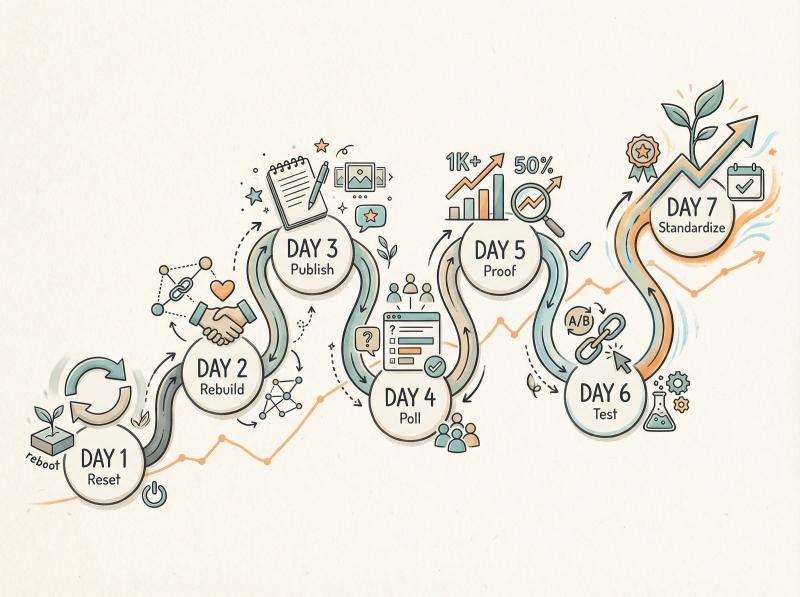
Day 1: Reset Eligibility + Trust
- Confirm “anyone” visibility for future posts
- Remove automation tools that put you at restriction risk (browser extensions, auto-engagement bots, scrapers)
- If you got policy actions, address those first before posting new content
Day 2: Rebuild Relevance Signals
- Comment thoughtfully on 10 posts in your niche (real sentences with value, not just “great post!”)
- Connect with 5-10 ideal audience people (engage with their content first so you're not a stranger)
- Optimize your profile for clear topic alignment with the content you plan to post (headline, about section, experience)
Day 3: Publish a “High-Dwell” Post
Pick one approach:
- Native document carousel: “The checklist I wish I had when starting [X]"
- Multi-image: "before/after + lesson learned"
- Text post: hook → bullets → takeaway → thoughtful question
Use a question that invites expertise, not compliments.
Day 4: Publish a Poll (Impressions Play)
Make it a real debate (two valid options with tradeoffs), not trivia.
Day 5: Publish a Proof Post
- “Here's what happened when we did X”
- Share 3 numbers + 3 lessons + 1 mistake
- Give people something concrete and real, not just theory
Day 6: Run Your Link Experiment
- Test value-first post with link in comment (vs. link in post body)
- Or test the new approach: 3+ helpful on-topic links in the post itself
- Track which performs better for your audience
Day 7: Standardize What Worked
- Pick the best-performing format + hook type from days 3-6
- Schedule 2-3 posts/week for the next month with that structure
- Keep iterating based on results
How to Use Scheduling Without Killing Your Reach
If you're cross-posting or scheduling content, the main thing that kills LinkedIn impressions is not adapting the content and not being present for early engagement.
This is where a tool like Post Bridge can actually help (without hurting your reach).
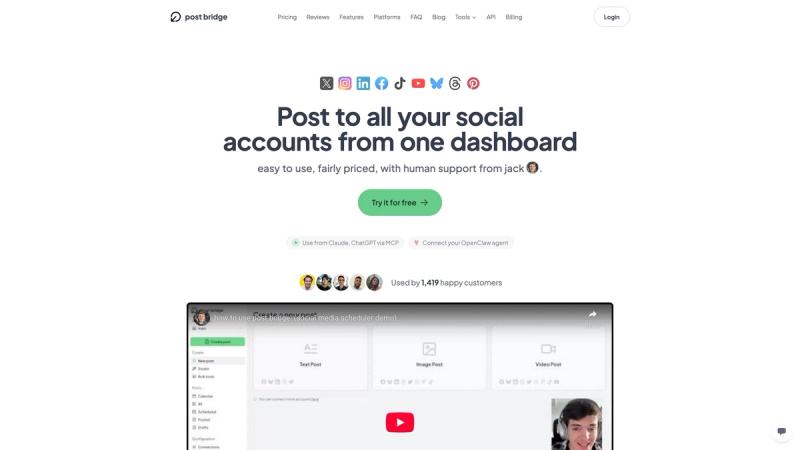
Post Bridge provides a unified dashboard for scheduling across 9 social platforms, including LinkedIn. The interface prioritizes simplicity and cross-platform consistency management.
What Post Bridge Does for LinkedIn
Post Bridge lets you:
- Schedule LinkedIn posts from one dashboard (useful for consistency)
- Customize captions per platform so you don't post "Twitter-speak" to LinkedIn
- Plan content in advance so you can focus on replying + engaging when posts go live
- Connect LinkedIn accounts/pages via OAuth (no password sharing, which violates LinkedIn's policies)
The LinkedIn-specific scheduler interface shows how Post Bridge adapts content for LinkedIn's audience while maintaining your posting schedule across platforms.
Also handy: Post Bridge's LinkedIn text formatter tool can help you structure posts for scannability (hooks + bullets + spacing), which is basically dwell-time optimization.
Best Practice with Scheduling
Using a scheduling tool like Post Bridge can help you plan and spread out your posts at optimal times without forgetting or rushing. this consistency signals LinkedIn that you're an active contributor, and it frees you to focus on engaging with comments (which is where the real magic happens with the new algorithm).
Pro tip:
- Schedule your posts for optimal times (weekday mornings tend to work well)
- Set a reminder to be online 20-30 minutes after the post goes live
- Use that time to respond to comments and keep the conversation going
- This combination of consistency + engagement is what beats the new algorithm
The key insight: scheduling doesn't hurt your reach. What hurts your reach is posting and then disappearing. Post Bridge helps with the consistency part so you can focus your energy on the engagement part.
Beyond LinkedIn, if you're managing multiple social platforms, Post Bridge supports 9 different networks for unified scheduling and management.
Supported platforms include:
- Instagram (visual content scheduling)
- Twitter/X (real-time updates)
- TikTok (short-form video)
- Facebook (community engagement)
- YouTube (video content)
- Pinterest (visual discovery)
- Threads (conversations)
- Bluesky (decentralized social)
Frequently Asked Questions
“Does scheduling reduce LinkedIn impressions?”
There's no official statement in LinkedIn's help documentation saying scheduled posts are penalized. What is official: scheduled posts publish with the visibility setting chosen at creation.
In practice, most “scheduling killed my reach” cases are actually: you weren't around to reply early, or the post wasn't adapted for LinkedIn.
Using a scheduling tool like Post Bridge doesn't hurt your reach. but you still need to show up for the early engagement window.
“Why are my impressions suddenly lower than last year?”
LinkedIn has explicitly tweaked feed recency to balance relevance, and users have seen older posts surface by design as part of this change. Also, the 360Brew algorithm change in Q4 2025 caused widespread drops of 47-65% in organic reach.
Measure yourself against recent benchmarks and your own rolling median, not 2024 numbers. The platform dynamics have shifted for everyone.
“Is 'shadowban' real on LinkedIn?”
LinkedIn doesn't call it that publicly. But restrictions and policy-based limiting are real and documented in LinkedIn's help center.
If your impressions collapse suddenly across all posts and you're seeing weird platform behavior, check for:
- Automation tool violations
- Policy violations
- Account restriction prompts in-app
“Should I stop using links in my posts?”
Not necessarily. New data suggests posts with 3+ helpful, on-topic links can get 236% higher reach. the key is that links must add value, not just be promo links with no context.
Test both approaches (link in post vs. link in comment) and see what works for your audience. Don't follow blanket rules blindly.
“How many posts per week should I publish?”
3-5 posts per week is a good target for most people. active enough to stay on the radar, but not so much you can't maintain quality.
More important than frequency is consistency + quality. Post on a regular schedule (same days/times each week) and make each post count. Post Bridge's LinkedIn scheduler can help you maintain that consistency.
“Will carousels/PDFs always get more reach?”
Format trends shift. As of early 2026, document carousels (PDFs) and multi-image posts are performing well. But the algorithm evolves.
Test different formats yourself and track what works for your audience. Don't chase format trends blindly. What works depends on your industry, network, and content style.
Moving Forward with LinkedIn's New Algorithm
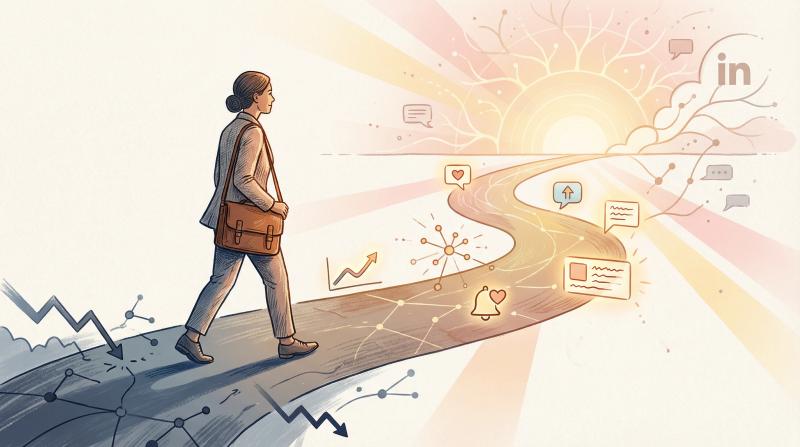
Here's the reality: every creator is navigating the same algorithm shift. LinkedIn has matured as a platform. It's filtering more aggressively for content that sparks genuine engagement and aligns with readers' interests.
By rethinking your approach using the strategies above (sharpening your profile, delivering quality content, encouraging real conversation, and staying consistent), you can still grow your reach organically. In fact, these changes are an opportunity. Many spammy or shallow posts are falling flat, leaving more room for those who share thoughtful, targeted content to stand out.
Above all, keep the purpose in mind: focus on delivering value to the right audience. It's better to have 500 impressions from your ideal clients or community than 5,000 from random strangers who will never engage. The algorithm is actually trying to help you with that by showing your posts to people who will care.
With a bit of strategy adjustment (and a commitment to consistency), your LinkedIn posts will start gaining traction again. Implement these best practices, give it time, and you'll turn those low-impression posts into content that gets your network talking.
For more insights on growing your social media presence organically, check out our guide on organic marketing for solo business owners. And if you want to dive deeper into platform-specific optimization, our post on Instagram post vs story vs reel covers similar format decisions for a different platform.
Remember: The goal isn't gaming the system. It's creating content that genuinely helps your audience and positioning yourself as the expert they turn to. Do that consistently, and the impressions will follow.